String Formatting and I/O
The Glue Between Computation and Communication
Scientific computing is not just about running algorithms — it is about communicating results. You need to format numbers in scientific notation for log files, generate filenames from parameter sweeps, read configuration from YAML files, and write results to CSV for further analysis. Python's f-strings and I/O libraries make this seamless when used correctly.
Definition: f-Strings with Format Specs
f-Strings with Format Specs
f-strings (formatted string literals, Python 3.6+) embed expressions
inside {} with optional format specifications:
snr_db = 15.3456789
ber = 1.23e-5
n_antennas = 4

# Scientific notation
print(f"BER = {ber:.2e}")            # BER = 1.23e-05

# Fixed-point with units
print(f"SNR = {snr_db:.1f} dB")      # SNR = 15.3 dB

# Padding and alignment
print(f"{'Method':<15} {'BER':>10}")  # Left/right alignment
print(f"{'MMSE':<15} {ber:>10.2e}")

# Thousands separator
n_samples = 1_000_000
print(f"Samples: {n_samples:,}")      # Samples: 1,000,000

# Shape inspection (invaluable for debugging)
import numpy as np
H = np.random.randn(4, 2)
print(f"H shape: {H.shape}, dtype: {H.dtype}")
Definition: Common Format Specifications
Common Format Specifications
The format spec mini-language after the colon in {value:spec}:
| Spec | Meaning | Example |
|---|---|---|
.2f |
2 decimal places | 3.14 |
.4e |
Scientific notation, 4 decimals | 1.2346e+02 |
.3g |
General format (auto-choose f/e) | 123 or 1.23e+05 |
>10 |
Right-align in 10 chars | SNR |
<10 |
Left-align in 10 chars | SNR |
^10 |
Center in 10 chars | SNR |
, |
Thousands separator | 1,000,000 |
+ |
Always show sign | +3.14 |
08d |
Zero-padded integer (8 digits) | 00000042 |
Definition: Logging vs. Print Statements
Logging vs. Print Statements
Use the logging module instead of print() for anything beyond
quick debugging:
import logging

logging.basicConfig(
    level=logging.INFO,
    format='%(asctime)s [%(levelname)s] %(message)s',
    datefmt='%H:%M:%S',
)
logger = logging.getLogger(__name__)

logger.info(f"Starting simulation: SNR={snr_db:.1f} dB, Nt={n_antennas}")
logger.debug(f"Channel matrix shape: {H.shape}")
logger.warning(f"BER={ber:.2e} below threshold — results may be unreliable")
Logging provides timestamps, severity levels, module names, and can be redirected to files without modifying any code.
f-string
A formatted string literal (Python 3.6+) that embeds expressions
inside {} within a string prefixed by f. Supports format
specifications for controlling number display.
Example: Formatting a Results Table
Given simulation results as a list of dictionaries, print a formatted table with aligned columns and proper number formatting.
Build the table
results = [
    {"method": "ZF", "snr_db": 10.0, "ber": 3.45e-3, "runtime_s": 0.123},
    {"method": "MMSE", "snr_db": 10.0, "ber": 1.87e-3, "runtime_s": 0.156},
    {"method": "ML", "snr_db": 10.0, "ber": 9.21e-4, "runtime_s": 12.45},
]

# Header
header = f"{'Method':<10} {'SNR (dB)':>10} {'BER':>12} {'Time (s)':>10}"
print(header)
print("-" * len(header))

# Data rows
for r in results:
    print(f"{r['method']:<10} {r['snr_db']:>10.1f} "
          f"{r['ber']:>12.2e} {r['runtime_s']:>10.3f}")
Output
Method       SNR (dB)          BER   Time (s)
------------------------------------------------
ZF             10.0     3.45e-03      0.123
MMSE           10.0     1.87e-03      0.156
ML             10.0     9.21e-04     12.450
Example: Reading and Writing Scientific Data Files
Read simulation parameters from a YAML config file, run a computation, and save results to both CSV and JSON formats.
Read YAML config
import yaml

with open('config.yaml', 'r') as f:
    config = yaml.safe_load(f)

# config.yaml might look like:
# simulation:
#   snr_range: [-5, 0, 5, 10, 15, 20]
#   n_realizations: 10000
#   channel: rayleigh

snr_range = config['simulation']['snr_range']
Write CSV results
import csv

with open('results.csv', 'w', newline='') as f:
    writer = csv.DictWriter(f, fieldnames=['snr_db', 'ber', 'throughput'])
    writer.writeheader()
    for result in results:
        writer.writerow(result)
Write JSON results
import json

with open('results.json', 'w') as f:
    json.dump({
        'config': config,
        'results': results,
        'metadata': {
            'timestamp': datetime.now().isoformat(),
            'python_version': sys.version,
        }
    }, f, indent=2)
String Formatting and File I/O Patterns
# Code from: ch01/python/string_io_patterns.py
# Load from backend supplements endpointf-String Format Spec Explorer
Enter a number and try different format specifications to see how Python renders it. Useful for finding the right spec for your use case.
Parameters
Common Mistake: The Mutable Default Argument Trap
Mistake:
Using a mutable object (list, dict) as a default argument:
def add_result(result, results=[]):  # BUG!
    results.append(result)
    return results

add_result("a")  # ['a']
add_result("b")  # ['a', 'b'] — the list persists across calls!
Correction:
Use None as the default and create the mutable inside the function:
def add_result(result, results=None):
    if results is None:
        results = []
    results.append(result)
    return results
This is one of Python's most notorious gotchas. The default value is evaluated once at function definition time, not at each call.
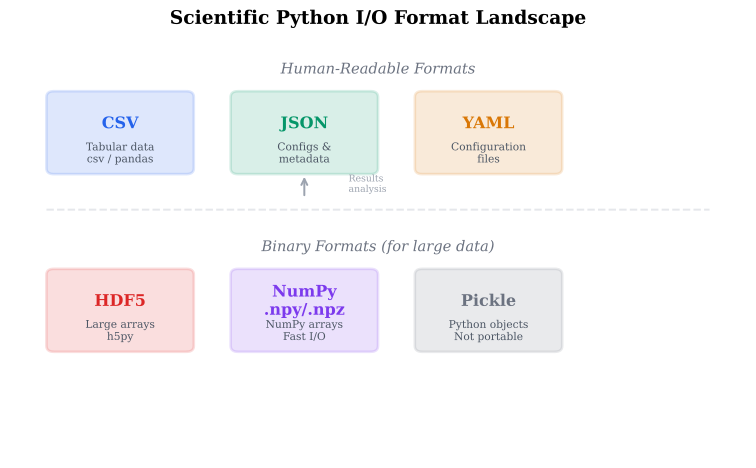
Scientific Python I/O Format Landscape
File Format Comparison
| Format | Best For | Human Readable | Python Module | Speed |
|---|---|---|---|---|
| CSV | Simple tabular data | Yes | csv / pandas | Fast |
| JSON | Nested configs, metadata | Yes | json | Fast |
| YAML | Configuration files | Yes | pyyaml | Moderate |
| HDF5 | Large numerical arrays | No | h5py | Very fast |
| Pickle | Arbitrary Python objects | No | pickle | Fast |
| NumPy .npy | Single NumPy array | No | numpy | Very fast |
| NumPy .npz | Multiple NumPy arrays | No | numpy | Very fast |
Quick Check
What does f"{1.23456e-5:.2e}" produce?
"1.23e-05"
"0.00001"
"1.2e-05"
"1.23456e-05"
"1.23e-05".2e means scientific notation with 2 decimal places.
Key Takeaway
f-strings with format specs are your primary tool for scientific output.
Use .2e for BER values, .1f for SNR in dB, and aligned columns
for result tables. Use YAML for configs, CSV for results, and the
logging module instead of print() for anything that matters.