CUDA Programming Model (Conceptual)
The CUDA Programming Model: Software Meets Hardware
CUDA provides a software abstraction that maps naturally onto GPU hardware. You do not write code for individual cores — instead, you define a kernel function and launch it on a grid of thread blocks. The CUDA runtime maps blocks to SMs and threads to warps automatically.
Understanding this mapping is essential even when using high-level libraries like CuPy or PyTorch, because the grid/block dimensions determine occupancy, memory access patterns, and ultimately performance.
Definition: CUDA Kernel
CUDA Kernel
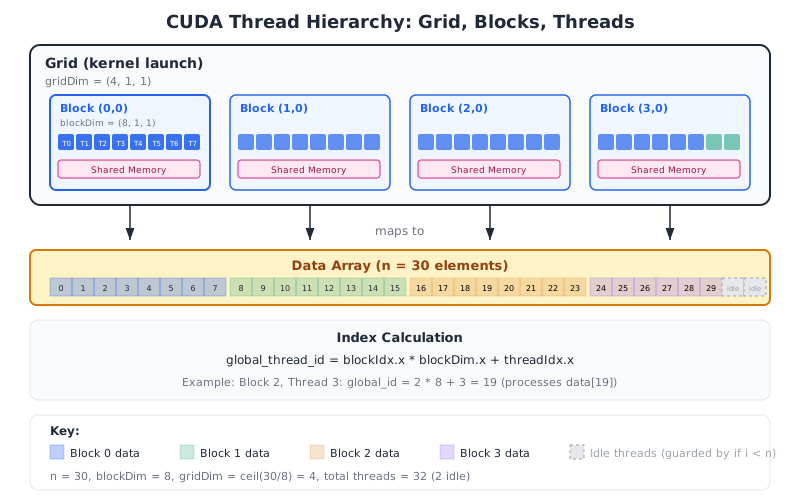
A kernel is a function that executes on the GPU. When launched, it is executed by every thread in the grid. Each thread has a unique identifier computed from built-in variables:
global_thread_id = blockIdx.x * blockDim.x + threadIdx.x
Conceptually in Python (Numba CUDA):
@cuda.jit
def add_kernel(a, b, c):
    i = cuda.grid(1)  # global thread index
    if i < len(a):
        c[i] = a[i] + b[i]
The if i < len(a) guard is necessary because the total number
of threads (blocks x threads_per_block) may exceed the array length.
Unlike CPU functions, a kernel has no return value. Results are written to output arrays in GPU memory.
Definition: Grid, Block, and Thread Hierarchy
Grid, Block, and Thread Hierarchy
CUDA organizes threads in a two-level hierarchy:
Thread: The smallest unit of execution. Each thread executes the kernel function with its own unique ID.
Block (Thread Block): A group of threads that can cooperate via shared memory and synchronization barriers. Maximum 1024 threads per block.
Grid: The collection of all blocks for a kernel launch.
The total number of threads is:
For a 1D launch on an array of length with block size :
threads_per_block = 256
blocks_per_grid = (n + threads_per_block - 1) // threads_per_block
add_kernel[blocks_per_grid, threads_per_block](a, b, c)
Definition: Host and Device
Host and Device
In CUDA terminology:
- Host: The CPU and its system memory (RAM)
- Device: The GPU and its memory (HBM/GDDR)
Data must be explicitly transferred between host and device:
# Host -> Device
d_array = cuda.to_device(host_array)

# Device -> Host
host_result = d_array.copy_to_host()
In higher-level libraries (CuPy, PyTorch), allocation and transfer are often implicit:
# CuPy: automatically allocates on GPU
x_gpu = cp.array([1, 2, 3])

# PyTorch: explicit device placement
x_gpu = torch.tensor([1, 2, 3], device='cuda')
The PCIe bus connecting host and device has bandwidth of 16-64 GB/s, which is 30-125x slower than GPU memory bandwidth.
Definition: Kernel Launch Overhead
Kernel Launch Overhead
Every kernel launch incurs a fixed overhead of approximately 5-50 microseconds (depending on the driver and GPU generation). This includes:
- Packaging kernel arguments
- Submitting the launch to the GPU command queue
- Hardware setup (allocating blocks to SMs)
For small workloads, this overhead can dominate:
If , the kernel is launch-overhead-bound and provides no benefit over CPU execution.
Rule of thumb: GPU acceleration requires at least ~10,000 elements to amortize launch overhead for simple operations.
Theorem: Host-Device Transfer Break-Even Point
For a computation with CPU time , GPU kernel time , and data size bytes, GPU offloading is beneficial only when:
where is the PCIe bandwidth and the factor 2 accounts for both upload and download. The minimum data size for which GPU is faster is:
If you transfer 1 GB of data at 16 GB/s (PCIe 4.0 x16), the transfer alone takes 62.5 ms. The GPU computation must save more than 62.5 ms to justify the offload. This is why keeping data on the GPU between operations is critical.
Theorem: Optimal Block Size for Occupancy
The block size must satisfy:
- is a multiple of 32 (warp size)
- (hardware limit)
- where is registers per thread and is the register file size per SM
- blocks fit given shared memory constraints
The occupancy-maximizing block size balances these constraints. In practice, is a robust default for most kernels.
Larger blocks allow more threads to share resources but limit how many blocks fit on each SM. Too-large blocks waste resources on SMs that could run more blocks. 256 threads = 8 warps per block, which divides evenly into most SM configurations.
Example: Computing Grid Dimensions for a 2D Operation
You need to process a image where each pixel undergoes an independent computation. Choose block and grid dimensions using 2D thread blocks.
Choose block dimensions
Use a 2D block of threads (a common choice):
block_dim = (16, 16)
This gives 256/32 = 8 warps per block.
Compute grid dimensions
grid_dim = (
    (1920 + 16 - 1) // 16,  # = 120
    (1080 + 16 - 1) // 16,  # = 68
)
Total threads: , covering all pixels with 15,360 idle threads (0.7% waste).
Guard against out-of-bounds
@cuda.jit
def process_image(img, out, width, height):
    x, y = cuda.grid(2)
    if x < width and y < height:
        out[y, x] = transform(img[y, x])
Example: When GPU Offloading Loses to CPU
You want to add two float32 vectors of length on a GPU with PCIe 4.0 x16 (25 GB/s effective) and 10 us kernel launch overhead. The CPU can add them in 0.5 us. Is GPU worthwhile?
Compute transfer time
Data to transfer: bytes (2 inputs + 1 output).
Compute total GPU time
$
Compare with CPU
CPU: , GPU: .
The GPU is 21x slower due to launch overhead. The break-even point for vector addition is roughly elements.
Example: Minimizing Transfers with Data Locality
A pipeline applies 5 sequential operations to a large array: normalize, filter, FFT, threshold, inverse FFT. Compare the naive approach (transfer for each operation) vs keeping data on GPU throughout.
Naive approach (5 round trips)
For a 100 MB array at 25 GB/s PCIe: Each operation is preceded by upload and followed by download.
Data-local approach (1 round trip)
Upload once, execute all 5 kernels, download once: 5x reduction in transfer time. The intermediate results stay in GPU memory, never touching the CPU.
Code pattern
import cupy as cp
x_gpu = cp.asarray(x_cpu)       # one upload
x_gpu = normalize(x_gpu)
x_gpu = bandpass_filter(x_gpu)
x_gpu = cp.fft.fft(x_gpu)
x_gpu = threshold(x_gpu)
x_gpu = cp.fft.ifft(x_gpu)
result = x_gpu.get()             # one download
Grid and Block Dimension Visualizer
Adjust array size and block dimensions to see how threads map to data elements, including idle threads and occupancy estimates.
Parameters
Transfer vs Compute Break-Even Calculator
Explore how data size, PCIe bandwidth, and GPU speedup interact to determine when GPU offloading is beneficial.
Parameters
CUDA Thread Hierarchy: Grid, Blocks, Threads
Quick Check
What is the maximum number of threads per block in CUDA?
256
512
1024
2048
Since compute capability 2.0 (Fermi, 2010), the limit has been 1024 threads per block.
Common Mistake: Launching Kernels on Tiny Arrays
Mistake:
Offloading small computations to the GPU expecting speedup:
x_gpu = cp.array([1.0, 2.0, 3.0])
y_gpu = cp.sqrt(x_gpu)  # GPU kernel for 3 elements!
Correction:
Keep small computations on the CPU. GPU offloading requires tens of thousands of elements to amortize launch overhead:
if len(x) > 50_000:
    x_gpu = cp.asarray(x)
    y_gpu = cp.sqrt(x_gpu)
else:
    y = np.sqrt(x)
Key Takeaway
The single most important GPU optimization is data locality: upload data to the GPU once, perform all operations there, and download results once. Every host-device transfer is 30-100x slower than GPU memory access and can easily negate the GPU's computational advantage.
Kernel
A function that executes on the GPU, launched across a grid of thread blocks. Every thread executes the same kernel code with a unique thread ID.
Related: Grid
Grid
The collection of all thread blocks for a single kernel launch. Grid dimensions determine the total number of threads.
Related: Kernel