Tensors vs. NumPy Arrays
Definition: PyTorch Tensor
PyTorch Tensor
A PyTorch tensor is a multi-dimensional array stored in contiguous memory that supports:
- Device placement — CPU or GPU (
cuda,mps). - Automatic differentiation — optional gradient tracking.
- NumPy-compatible API — slicing, broadcasting,
@operator.
import torch

x = torch.tensor([1.0, 2.0, 3.0])            # from list
y = torch.zeros(3, 4, dtype=torch.float64)    # explicit dtype
z = torch.randn(2, 3, device="cuda")          # directly on GPU
Internally, a tensor is a view into a Storage object with a
shape, stride, and offset — the same strided-memory model as NumPy.
Unlike NumPy arrays, tensors default to float32, not float64.
This is intentional: single precision is sufficient for most deep
learning and is 2x faster on GPUs. For scientific computing, you
may want to explicitly request torch.float64.
Definition: Device Placement and Transfer
Device Placement and Transfer
Every tensor lives on a specific device. Moving data between devices is explicit:
device = torch.device("cuda" if torch.cuda.is_available() else "cpu")
x_cpu = torch.randn(1000)
x_gpu = x_cpu.to(device)        # CPU -> GPU copy
x_back = x_gpu.cpu()            # GPU -> CPU copy
x_gpu2 = x_gpu.cuda(1)          # GPU 0 -> GPU 1
Key rule: all operands in a computation must reside on the same
device. PyTorch raises RuntimeError if you try to combine tensors
on different devices. This is a deliberate design choice — implicit
transfers hide performance bugs.
Use torch.cuda.synchronize() before timing GPU operations;
CUDA launches are asynchronous, so CPU-side timers undercount
without synchronization.
Definition: Tensor Data Types
Tensor Data Types
PyTorch provides a rich set of data types:
| Category | Types |
|---|---|
| Float | float16, bfloat16, float32, float64 |
| Integer | int8, int16, int32, int64 |
| Complex | complex64, complex128 |
| Boolean | bool |
Casting is explicit via .to(dtype) or convenience methods:
x = torch.tensor([1, 2, 3])          # int64
y = x.float()                         # -> float32
z = x.to(torch.complex128)            # -> complex128
Promotion rules: PyTorch follows NumPy-like type promotion
but defaults to float32 (not float64) for floating-point literals.
Definition: In-Place Operations
In-Place Operations
Operations suffixed with _ modify the tensor in place:
x = torch.randn(3)
x.add_(1.0)        # x += 1.0, no new allocation
x.mul_(2.0)        # x *= 2.0
x.zero_()           # fill with zeros
x.clamp_(0, 1)     # clamp between 0 and 1
In-place ops save memory but have two caveats:
- They break autograd if the tensor is needed for gradient computation.
- They can silently corrupt shared views (just like NumPy).
The convention is simple: if a method name ends with _, it is in-place.
In scientific computing, in-place ops are useful for iterative algorithms where you update a state tensor repeatedly (e.g., gradient descent steps). But avoid them inside autograd-tracked computations.
Definition: Tensor Creation Functions
Tensor Creation Functions
PyTorch mirrors NumPy's creation API with slightly different names:
| NumPy | PyTorch |
|---|---|
np.zeros(shape) |
torch.zeros(shape) |
np.ones(shape) |
torch.ones(shape) |
np.eye(n) |
torch.eye(n) |
np.arange(n) |
torch.arange(n) |
np.linspace(a,b,n) |
torch.linspace(a, b, n) |
np.random.randn(n) |
torch.randn(n) |
np.empty(shape) |
torch.empty(shape) |
The *_like family copies shape, dtype, and device:
y = torch.zeros_like(x) # same shape/dtype/device as x
Theorem: Contiguity and Stride Formula
A tensor with shape is contiguous (C-order) if and only if its strides satisfy:
A transposed tensor typically has non-contiguous strides. Calling
.contiguous() copies data into a new contiguous block.
Just like NumPy, PyTorch tensors are views into flat memory. The stride tells you how many elements to skip in each dimension. Transpose merely swaps the strides without moving data — this is O(1) but makes the layout non-contiguous.
Dtype Performance Benchmark
Compare the speed of matrix multiplication across dtypes (float16, float32, float64) and matrix sizes.
Parameters
Example: Creating and Moving Tensors Between Devices
Create a random matrix on CPU, move it to GPU (if available), compute its matrix product with its transpose, and move the result back. Time each step.
Implementation
import torch
import time

device = torch.device("cuda" if torch.cuda.is_available() else "cpu")

# Create on CPU
A = torch.randn(100, 100, dtype=torch.float64)

# Move to device
t0 = time.perf_counter()
A_dev = A.to(device)
if device.type == "cuda":
    torch.cuda.synchronize()
t_transfer = time.perf_counter() - t0

# Compute on device
t0 = time.perf_counter()
C = A_dev @ A_dev.T
if device.type == "cuda":
    torch.cuda.synchronize()
t_compute = time.perf_counter() - t0

# Move result back
C_cpu = C.cpu()

print(f"Transfer: {t_transfer*1e3:.2f} ms")
print(f"Compute:  {t_compute*1e3:.2f} ms")
print(f"Shape:    {C_cpu.shape}")
print(f"Symmetric: {torch.allclose(C_cpu, C_cpu.T)}")
Key Observations
- The transfer time dominates for small matrices — this is the latency floor of PCIe/NVLink.
- For large matrices (), GPU compute time is far smaller than CPU compute time, justifying the transfer cost.
- The product is always symmetric, which
torch.allcloseconfirms.
Example: In-Place Gradient Descent on a Quadratic
Minimize where using in-place tensor operations for the update step .
Implementation
import torch

A = torch.diag(torch.tensor([1.0, 2.0, 3.0]))
x = torch.tensor([3.0, 2.0, 1.0])
lr = 0.1

for k in range(50):
    grad = A @ x                    # gradient = Ax
    x.sub_(lr * grad)               # in-place update: x -= lr * grad
    loss = 0.5 * x @ (A @ x)
    if k % 10 == 0:
        print(f"Step {k:3d}: loss = {loss.item():.6f}")

print(f"Solution: {x}")  # should converge to [0, 0, 0]
Why In-Place Works Here
Since we are not using autograd (we compute the gradient
analytically), in-place operations are safe and save memory.
Each .sub_() avoids allocating a new tensor.
Example: Views vs. Copies in PyTorch
Demonstrate the difference between reshape (returns a view when possible),
clone (always copies), and contiguous (copies only when needed).
Implementation
import torch

x = torch.arange(12, dtype=torch.float32)
y = x.reshape(3, 4)          # view — shares memory
y[0, 0] = 99.0
print(f"x[0] = {x[0]}")      # 99.0 — mutation visible!

z = x.clone().reshape(3, 4)  # clone first — independent copy
z[0, 0] = -1.0
print(f"x[0] = {x[0]}")      # still 99.0

# Transpose creates a non-contiguous view
w = y.T
print(f"Contiguous: {w.is_contiguous()}")   # False
w_c = w.contiguous()  # copies into contiguous layout
print(f"Contiguous: {w_c.is_contiguous()}")  # True
Tensor Memory Layout Explorer
Visualize how different shapes and strides map tensor elements to physical memory positions. Observe how transpose swaps strides without copying data.
Parameters
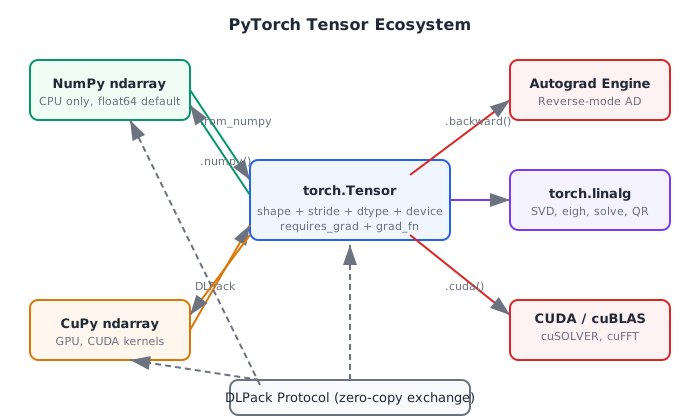
PyTorch Tensor Ecosystem
Quick Check
What is the default floating-point dtype for torch.randn(5)?
float16
float32
float64
bfloat16
PyTorch defaults to float32 for all floating-point creation functions.
Common Mistake: Silent Precision Loss with Default float32
Mistake:
Performing scientific computations with the default float32 without
realizing the precision loss compared to NumPy's float64.
Correction:
Explicitly set dtype=torch.float64 for computations requiring
high precision (e.g., numerical integration, eigenvalue problems):
x = torch.randn(100, dtype=torch.float64)
torch.set_default_dtype(torch.float64)  # or change the global default
Common Mistake: Cross-Device Operation Error
Mistake:
Trying to add a CPU tensor to a GPU tensor:
a = torch.randn(5)                    # CPU
b = torch.randn(5, device="cuda")     # GPU
c = a + b   # RuntimeError!
Correction:
Move both tensors to the same device before operating:
c = a.to(b.device) + b
Historical Note: From Torch to PyTorch
2000s-2010sPyTorch (2017) descends from Torch7, a Lua-based tensor library created at NYU by Ronan Collobert and collaborators in 2002. Facebook AI Research (FAIR) rewrote it in Python, keeping the C/CUDA backend. The name "tensor" in this context follows the tradition of multilinear algebra, where a tensor is a multi-indexed quantity that transforms according to specific rules under change of basis — though in practice, PyTorch tensors are simply multi-dimensional arrays.
Historical Note: Define-by-Run vs. Define-and-Run
2010sPyTorch popularized the define-by-run paradigm (dynamic computational graphs), where the graph is built during execution rather than compiled beforehand. This was a departure from TensorFlow 1.x's static graph approach and proved more natural for researchers. Chainer (2015) pioneered this idea; PyTorch adopted and refined it.
Device
The hardware location where a tensor's data resides: cpu, cuda
(NVIDIA GPU), or mps (Apple Silicon GPU).
Related: Tensor
dtype
The data type of tensor elements (e.g., torch.float32,
torch.complex128, torch.int64).
Related: Tensor
Stride
A tuple indicating how many elements to skip in memory to advance one position along each dimension. Determines whether a tensor is contiguous.
In-Place Operation
A tensor operation suffixed with _ that modifies the tensor's
data without allocating new memory (e.g., x.add_(1)).
NumPy vs. PyTorch API Comparison
| Feature | NumPy | PyTorch |
|---|---|---|
| Default float dtype | float64 | float32 |
| GPU support | No (need CuPy) | Built-in (.cuda()) |
| Autograd | No | Built-in (requires_grad) |
| In-place convention | out= parameter | Method ending with _ |
| Random creation | np.random.randn(n) | torch.randn(n) |
| Matrix multiply | A @ B | A @ B (identical) |
| Complex support | np.complex128 | torch.complex128 |
| View/reshape | np.reshape (view when possible) | torch.reshape (view when possible) |
Key Takeaway
PyTorch tensors are NumPy arrays with superpowers: GPU placement,
automatic differentiation, and in-place operations. The API is
deliberately similar to NumPy, but watch out for the default dtype
(float32 vs. float64) and the requirement that all operands
share the same device.
Tensor Basics and Device Management
# Code from: ch12/python/tensor_basics.py
# Load from backend supplements endpoint