Memory Management on GPU
Why GPU Memory Management Matters
GPU memory is a scarce resource: a typical research GPU has 16-80 GB of VRAM, compared to hundreds of GB of system RAM. When training large models or running big simulations, out-of-memory (OOM) errors are the single most common failure mode. Understanding how PyTorch allocates, caches, and frees GPU memory is essential for writing production code that does not crash at 3 AM.
This section covers the PyTorch caching allocator, memory tracking tools, gradient checkpointing, and practical strategies for reducing peak memory usage.
Definition: GPU Memory Hierarchy
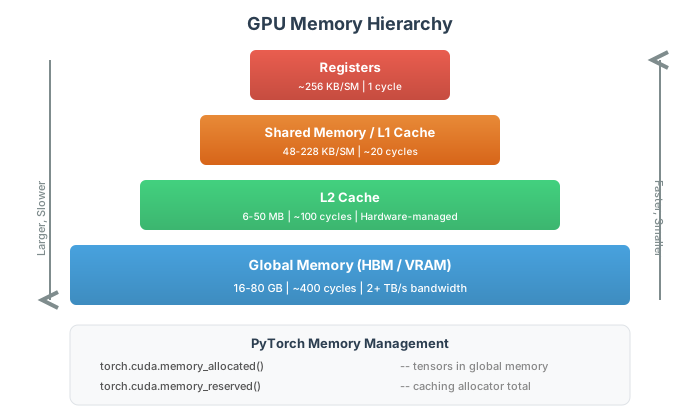
GPU Memory Hierarchy
A modern NVIDIA GPU has multiple levels of memory:
- Global Memory (VRAM): 16--80 GB, high bandwidth (~2 TB/s on A100), but high latency (~400 cycles). This is where tensors live.
- Shared Memory (SMEM): 48--228 KB per Streaming Multiprocessor (SM), low latency (~20 cycles), programmer-managed.
- Registers: ~256 KB per SM, fastest access (1 cycle).
- L2 Cache: 6--50 MB, hardware-managed.
PyTorch users primarily manage global memory; shared memory is relevant only when writing custom CUDA kernels.
The memory bandwidth of modern GPUs (2+ TB/s on A100) is often the bottleneck, not compute. Many operations are memory-bound: they spend more time moving data than computing on it.
Definition: PyTorch Caching Memory Allocator
PyTorch Caching Memory Allocator
PyTorch does not call cudaMalloc/cudaFree for every tensor creation
and deletion. Instead, it maintains a caching allocator that:
- Requests large blocks from CUDA and subdivides them
- Keeps freed blocks in a cache for reuse
- Only returns memory to CUDA when explicitly asked via
torch.cuda.empty_cache()
This is why nvidia-smi shows more memory used than
torch.cuda.memory_allocated(): the difference is cached but unused memory.
import torch
# Allocated: memory currently used by tensors
alloc = torch.cuda.memory_allocated()
# Reserved: total memory held by the caching allocator
reserved = torch.cuda.memory_reserved()
# Cached but free = reserved - allocated
The caching allocator dramatically reduces allocation overhead.
A cudaMalloc call can take 1--10 ms; a cached allocation takes
microseconds.
Definition: GPU Memory Fragmentation
GPU Memory Fragmentation
Fragmentation occurs when free memory exists but is split into non-contiguous blocks too small to satisfy a large allocation request.
Symptoms:
torch.cuda.memory_allocated()shows plenty of free memory- Yet a new allocation raises
CUDA out of memory torch.cuda.memory_stats()['active_blocks.all.current']is high
Mitigation strategies:
- Pre-allocate tensors and reuse them (avoid dynamic allocation patterns)
- Use
torch.cuda.empty_cache()to return fragmented blocks to CUDA - Set
max_split_size_mbviaPYTORCH_CUDA_ALLOC_CONFto control splitting
Setting PYTORCH_CUDA_ALLOC_CONF=max_split_size_mb:512 prevents
the allocator from splitting blocks smaller than 512 MB, which
can reduce fragmentation at the cost of slightly higher peak usage.
Definition: Memory Tracking and Snapshots
Memory Tracking and Snapshots
PyTorch provides detailed memory tracking:
# Summary statistics
print(torch.cuda.memory_summary())

# Detailed allocation history
torch.cuda.memory._record_memory_history()
# ... run your code ...
snapshot = torch.cuda.memory._snapshot()
torch.cuda.memory._record_memory_history(enabled=None)
The snapshot contains every allocation and free event with stack traces, enabling you to identify exactly which line of code is responsible for peak memory usage.
Definition: Gradient Checkpointing
Gradient Checkpointing
During backpropagation, PyTorch stores all intermediate activations from the forward pass. For a network with layers and activation size , this costs memory.
Gradient checkpointing trades compute for memory by:
- Storing activations only at selected checkpoint layers
- Recomputing intermediate activations during the backward pass
With checkpoints, memory drops to at the cost of one extra forward pass (~33% more compute).
from torch.utils.checkpoint import checkpoint

class MyModel(nn.Module):
    def forward(self, x):
        x = checkpoint(self.block1, x, use_reentrant=False)
        x = checkpoint(self.block2, x, use_reentrant=False)
        return self.head(x)
Always use use_reentrant=False (the new default in PyTorch 2.x).
The legacy use_reentrant=True has subtle bugs with multiple
requires_grad inputs.
Definition: In-Place Operations and Memory Savings
In-Place Operations and Memory Savings
In-place operations modify a tensor without allocating new memory:
x.add_(1)       # in-place add
x.relu_()       # in-place ReLU
x.mul_(0.99)    # in-place multiply (weight decay)
This saves one tensor allocation per operation. However, in-place
operations on tensors that require gradients can corrupt the autograd
graph. PyTorch raises a RuntimeError if it detects this.
In-place operations are safe in the optimizer step (e.g., SGD parameter updates) because parameter updates happen outside the computation graph.
Theorem: Optimal Checkpointing Memory Bound
For a sequential network with layers, each producing activations of size , the minimum peak memory with gradient checkpointing is:
achieved by placing checkpoints every layers. Without checkpointing, .
With checkpoints, you store activations plus at most activations between consecutive checkpoints during recomputation. The total is , minimized at .
Memory model
Let be the number of checkpoints. During backward pass between two consecutive checkpoints, we recompute and store at most activations. Total stored: .
Optimization
Minimizing : gives , yielding .
Theorem: Autograd Memory Overhead
For a computation with gradient computation, the peak memory is:
where is the size of activation . The activations typically dominate: for a ResNet-50 with batch size 32, activations use ~6 GB while parameters use only ~100 MB.
Parameters are fixed-size. Activations scale with batch size and spatial resolution, making them the primary memory consumer.
Theorem: Practical Peak Memory Estimation
For a model with parameters in FP32, batch size , and average activation size bytes per sample per layer across layers, the approximate peak GPU memory during training is:
where the factor 8 for Adam comes from storing both first and second moment estimates (each 4 bytes in FP32).
Adam stores 2 extra copies of the parameters (momentum and variance). The bytes for parameters+gradients+optimizer is fixed; activations scale linearly with batch size.
Example: Tracking GPU Memory During Training
Monitor GPU memory allocation through a training step to identify the peak memory usage and which operation causes it.
Setup memory tracking
import torch
import torch.nn as nn

device = torch.device('cuda')
torch.cuda.reset_peak_memory_stats()

model = nn.Sequential(
    nn.Linear(1024, 2048),
    nn.ReLU(),
    nn.Linear(2048, 2048),
    nn.ReLU(),
    nn.Linear(2048, 10),
).to(device)
Run and measure
x = torch.randn(256, 1024, device=device)
print(f"After input:  {torch.cuda.memory_allocated()/1e6:.1f} MB")

y = model(x)
print(f"After forward: {torch.cuda.memory_allocated()/1e6:.1f} MB")

loss = y.sum()
loss.backward()
print(f"After backward: {torch.cuda.memory_allocated()/1e6:.1f} MB")
print(f"Peak memory:    {torch.cuda.max_memory_allocated()/1e6:.1f} MB")
Use memory summary
print(torch.cuda.memory_summary(abbreviated=True))
# Shows: Allocated / Reserved / Active / Inactive blocks
Example: Applying Gradient Checkpointing to Reduce Memory
Compare peak GPU memory of a deep network with and without gradient checkpointing. Measure the memory savings and compute overhead.
Define model with checkpointing
import torch
import torch.nn as nn
from torch.utils.checkpoint import checkpoint

class Block(nn.Module):
    def __init__(self, dim):
        super().__init__()
        self.net = nn.Sequential(
            nn.Linear(dim, dim), nn.ReLU(),
            nn.Linear(dim, dim), nn.ReLU(),
        )
    def forward(self, x):
        return self.net(x) + x  # residual

class DeepNet(nn.Module):
    def __init__(self, dim, n_blocks, use_checkpoint=False):
        super().__init__()
        self.blocks = nn.ModuleList([Block(dim) for _ in range(n_blocks)])
        self.use_checkpoint = use_checkpoint

    def forward(self, x):
        for block in self.blocks:
            if self.use_checkpoint:
                x = checkpoint(block, x, use_reentrant=False)
            else:
                x = block(x)
        return x
Compare memory usage
device = torch.device('cuda')
for ckpt in [False, True]:
    torch.cuda.reset_peak_memory_stats()
    model = DeepNet(512, 20, use_checkpoint=ckpt).to(device)
    x = torch.randn(128, 512, device=device)
    y = model(x)
    y.sum().backward()
    peak = torch.cuda.max_memory_allocated() / 1e6
    print(f"Checkpoint={ckpt}: peak={peak:.1f} MB")
Example: Debugging CUDA Out-of-Memory Errors
Your training script crashes with CUDA out of memory. Systematically
diagnose the cause and fix it without simply reducing batch size.
Step 1: Check baseline memory
import torch
# Is another process using the GPU?
# Run: nvidia-smi
print(f"Allocated: {torch.cuda.memory_allocated()/1e9:.2f} GB")
print(f"Reserved:  {torch.cuda.memory_reserved()/1e9:.2f} GB")
Step 2: Find the peak
torch.cuda.reset_peak_memory_stats()
# Run training step...
print(f"Peak: {torch.cuda.max_memory_allocated()/1e9:.2f} GB")
Step 3: Systematic fixes
# 1. Clear cache
torch.cuda.empty_cache()

# 2. Use gradient checkpointing (saves ~60% activation memory)
from torch.utils.checkpoint import checkpoint

# 3. Use mixed precision (halves activation memory)
with torch.autocast('cuda'):
    output = model(input)

# 4. Gradient accumulation (effective large batch, small memory)
for i, batch in enumerate(loader):
    loss = model(batch).sum() / accum_steps
    loss.backward()
    if (i + 1) % accum_steps == 0:
        optimizer.step()
        optimizer.zero_grad()
GPU Memory Allocation Timeline
Visualize GPU memory usage through forward pass, backward pass, and optimizer step. Adjust model depth and batch size to see how each factor affects peak memory.
Parameters
GPU Memory Hierarchy
GPU Memory Management
# Code from: ch13/python/memory_management.py
# Load from backend supplements endpointQuick Check
After deleting a large tensor with del tensor, you notice that
nvidia-smi still shows the same GPU memory usage. Why?
Python's garbage collector has not run yet
PyTorch's caching allocator keeps the memory reserved for reuse
The tensor is still referenced somewhere in the computation graph
nvidia-smi has a reporting delay
The caching allocator holds freed blocks for fast reuse. Call torch.cuda.empty_cache() to return them to CUDA.
Common Mistake: Accumulating Loss Without .item()
Mistake:
Writing total_loss += loss in a training loop. This keeps the
entire computation graph alive because loss is a tensor with
grad_fn. After many iterations, GPU memory grows without bound.
Correction:
Use total_loss += loss.item() to extract the scalar value and
discard the graph. Alternatively, loss.detach() removes the
gradient connection.
Key Takeaway
Activations dominate training memory, not parameters. For a typical model, activations use 10-100x more memory than the model weights. Gradient checkpointing reduces activation memory from to at the cost of ~33% more compute.
Why This Matters: Memory Management in Massive MIMO Simulations
Simulating a massive MIMO system with 64 antennas, 16 users, and 1000 subcarriers requires storing channel matrices of shape in complex64, consuming MB per batch. With , that is already 1 GB for channels alone. Memory management techniques from this section (checkpointing, mixed precision, pre-allocation) are essential for fitting these simulations on a single GPU.
See full treatment in JAX: Functional Numerical Computing
Historical Note: GPU Memory Growth
21st centuryThe original NVIDIA GeForce 256 (1999) had 32 MB of DDR memory. The A100 (2020) has 80 GB of HBM2e -- a 2500x increase in 21 years. Yet model sizes have grown even faster: GPT-3 (2020) requires 350 GB just for parameters in FP16, far exceeding any single GPU. This gap between model size and GPU memory is the fundamental driver behind memory optimization techniques like gradient checkpointing, mixed precision, and model parallelism.
VRAM (Video RAM)
The dedicated high-bandwidth memory on a GPU, used to store tensors, activations, and model parameters. Typically HBM2/HBM3 on data center GPUs.
Related: Caching Allocator
Caching Allocator
PyTorch's memory management layer that pools GPU memory blocks for reuse, avoiding expensive cudaMalloc/cudaFree calls on every tensor allocation.
Related: VRAM (Video RAM)
Memory Fragmentation
A state where free GPU memory is split into small non-contiguous blocks, preventing large allocations even when total free memory is sufficient.
Gradient Checkpointing
A technique that reduces memory usage by recomputing intermediate activations during the backward pass instead of storing them all from the forward pass.
OOM (Out of Memory)
A CUDA error raised when the GPU cannot allocate the requested memory. The most common error in GPU-accelerated deep learning.