Publication-Quality Formatting
From Notebook Sketch to Journal Figure
A figure that looks good in Jupyter often fails at the journal stage: fonts are too small, linewidths vanish at print scale, and file format is wrong. This section teaches the formatting rules for IEEE, Springer, and ACM venues — covering fonts, DPI, figure sizes, and export formats.
Definition: rcParams — Global Style Configuration
rcParams — Global Style Configuration
matplotlib.rcParams is a dict-like object controlling every default:
import matplotlib.pyplot as plt

plt.rcParams.update({
    'font.family': 'serif',
    'font.serif': ['Times New Roman'],
    'font.size': 10,
    'axes.labelsize': 11,
    'axes.titlesize': 12,
    'xtick.labelsize': 9,
    'ytick.labelsize': 9,
    'legend.fontsize': 9,
    'figure.figsize': (3.5, 2.5),
    'figure.dpi': 150,
    'savefig.dpi': 300,
    'lines.linewidth': 1.5,
})
Use plt.rcdefaults() to reset to defaults.
Define rcParams at the top of your script, not scattered through plotting
code. Consider a project-wide matplotlibrc file.
Definition: IEEE Transactions Figure Specifications
IEEE Transactions Figure Specifications
IEEE requires:
- Single column: 3.5 inches wide; double column: 7.16 inches
- Font size: minimum 8 pt in the printed figure
- Format: EPS or PDF (vector), or TIFF at 600 DPI (raster)
- Font: preferably Times New Roman or Computer Modern
IEEE_SINGLE = {
    'figure.figsize': (3.5, 2.625),   # 4:3 aspect
    'font.family': 'serif',
    'font.size': 8,
    'savefig.dpi': 600,
    'savefig.format': 'pdf',
}
Theorem: DPI-Size Relationship
The pixel dimensions of a saved figure are:
For a 3.5 in 2.5 in figure at 300 DPI, the output is pixels. At 600 DPI, it is pixels.
Set figsize to the physical print size (in inches) and DPI to the
journal requirement. Never resize the figure after export.
Example: Complete IEEE-Ready BER Figure
Create a publication-quality BER curve with IEEE formatting that passes journal submission requirements.
Style setup
import matplotlib.pyplot as plt
import numpy as np
from scipy.special import erfc

plt.rcParams.update({
    'font.family': 'serif',
    'font.size': 8,
    'axes.labelsize': 9,
    'legend.fontsize': 7,
    'lines.linewidth': 1.2,
    'lines.markersize': 4,
    'figure.figsize': (3.5, 2.625),
    'savefig.dpi': 600,
    'axes.grid': True,
    'grid.alpha': 0.3,
})
Plotting
snr_db = np.arange(0, 21)
snr = 10**(snr_db / 10)
fig, ax = plt.subplots()
ax.semilogy(snr_db, 0.5*erfc(np.sqrt(snr)), 'o-',
label='BPSK')
ax.semilogy(snr_db, 0.5*erfc(np.sqrt(snr/2)), 's--',
label='QPSK')
ax.set(xlabel=r' (dB)', ylabel='BER')
ax.set_ylim(1e-6, 1)
ax.legend(loc='lower left')
fig.savefig('ber_ieee.pdf', bbox_inches='tight')
Example: Using LaTeX in Labels and Annotations
Add properly typeset mathematical labels using Matplotlib's built-in mathtext renderer (no LaTeX installation required).
Implementation
fig, ax = plt.subplots(figsize=(6, 4))
ax.set_xlabel(r' (dB)')
ax.set_ylabel(r'')
ax.set_title(r'BER for BPSK in AWGN Channel')
ax.annotate(r'',
xy=(10, 1e-5), xytext=(6, 1e-3),
arrowprops=dict(arrowstyle='-|>', color='red'),
fontsize=10, color='red')
Key rules
- Always use raw strings (
r'...') to avoid backslash issues. - Use
\mathrm{}for upright text inside math mode. - Use
\!for negative thin space and\,for thin space.
Common rcParams Cheatsheet
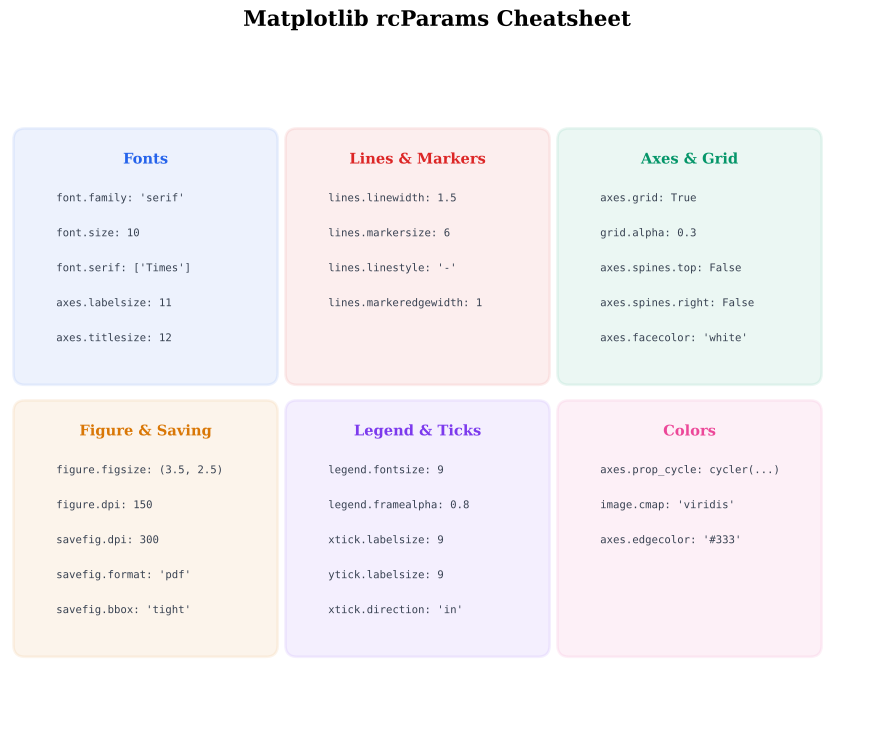
Figure Export Formats
| Format | Type | Quality | File Size | Best For |
|---|---|---|---|---|
| Vector | Lossless | Small | Journal papers, LaTeX | |
| SVG | Vector | Lossless | Small | Web, presentations |
| PNG | Raster | DPI-dependent | Medium | Slides, reports |
| TIFF | Raster | DPI-dependent | Large | Some journals |
| EPS | Vector | Lossless | Small | Legacy LaTeX workflows |
Common Mistake: Font Size Depends on Figure Size
Mistake:
Setting font.size=10 but figsize=(12, 8). When the figure is
shrunk to column width in the paper, the 10pt font becomes ~4pt — unreadable.
Correction:
Set figsize to the final print size (e.g., 3.5 in for IEEE single
column). Then 8pt font in the script stays 8pt in print.
Key Takeaway
Set figsize to the final print dimensions first, then adjust font
sizes. If the figure will be 3.5 inches wide in the paper, use
figsize=(3.5, 2.5) and choose fonts that look right at that size.
Never rely on scaling after export.
Quick Check
A figure is saved with figsize=(3.5, 2.5) and dpi=300. What are the pixel dimensions?
350 x 250
1050 x 750
3500 x 2500
700 x 500
pixels = figsize x DPI: 3.5300=1050, 2.5300=750.
Historical Note: The Viridis Revolution
2015In 2015, Matplotlib switched its default colormap from jet to
viridis, designed by Stéfan van der Walt and Nathaniel Smith.
Viridis was optimized for perceptual uniformity, colorblind-friendliness,
and grayscale printability. The change sparked a broader movement
across scientific software toward perceptually uniform colormaps.
DPI (Dots Per Inch)
The resolution of a raster image. Higher DPI means more pixels per physical inch, resulting in sharper prints.
rcParams
Matplotlib's global configuration dictionary controlling all default visual properties.