Domain-Specific Plot Types
Specialized Plots for Communications and RF
Every engineering domain has its own plot types. Wireless engineers use Smith charts for impedance matching, polar plots for antenna patterns, eye diagrams for ISI analysis, and waterfall plots for spectrum monitoring. These are all built on top of Matplotlib's primitives.
Definition: Smith Chart
Smith Chart
The Smith chart maps impedance to reflection coefficient via:
where is the characteristic impedance (typically 50). The chart is a unit disk in the -plane with circles of constant resistance and reactance.
# Plot a point at Z_L = 25 + j50 ohm
Z0 = 50
Z_L = 25 + 50j
Gamma = (Z_L - Z0) / (Z_L + Z0)
ax.plot(Gamma.real, Gamma.imag, 'ro', ms=8)
The scikit-rf package provides production-quality Smith charts:
import skrf; skrf.plotting.smith().
Definition: Eye Diagram
Eye Diagram
An eye diagram overlays many symbol periods of a received signal to reveal inter-symbol interference (ISI), timing jitter, and noise:
# Overlay consecutive symbol periods
symbols_per_trace = 2
n_samples_per_symbol = 16
segment_len = symbols_per_trace * n_samples_per_symbol

for i in range(0, len(signal) - segment_len, n_samples_per_symbol):
    segment = signal[i:i + segment_len]
    ax.plot(t_segment, segment, color='blue', alpha=0.02, lw=0.5)
A "wide open eye" indicates low ISI; a "closed eye" indicates severe distortion.
Definition: Polar Plots for Antenna Patterns
Polar Plots for Antenna Patterns
ax = fig.add_subplot(111, projection='polar') creates a polar
axes for antenna radiation patterns:
theta = np.linspace(0, 2*np.pi, 361)
pattern_db = 20 * np.log10(np.abs(np.sinc(2*np.sin(theta))) + 1e-10)

fig, ax = plt.subplots(subplot_kw={'projection': 'polar'})
ax.plot(theta, np.clip(pattern_db, -30, 0))
ax.set_rmax(0)
ax.set_rmin(-30)
ax.set_title('Antenna Pattern (dBi)')
Theorem: Eye Opening and BER
The vertical eye opening at the optimal sampling instant is related to the noise margin. For binary signaling with noise variance :
A wider eye opening means lower BER. The horizontal eye opening indicates timing margin for the clock recovery circuit.
The eye diagram is a visual summary of the channel's impact on the signal. If you can "see through" the eye, the receiver can reliably decide the transmitted bit.
Example: Eye Diagram with Raised Cosine Pulse Shaping
Generate an eye diagram for BPSK with raised cosine pulse shaping at different rolloff factors.
Implementation
from scipy.signal import firwin
import numpy as np
import matplotlib.pyplot as plt

sps = 16      # samples per symbol
n_sym = 200
rng = np.random.default_rng(42)
bits = 2 * rng.integers(0, 2, n_sym) - 1

# Upsample + pulse shape
upsampled = np.zeros(n_sym * sps)
upsampled[::sps] = bits
h = firwin(6*sps + 1, 1/sps)
signal = np.convolve(upsampled, h, mode='same')

# Add noise
snr_db = 20
noise = rng.standard_normal(len(signal)) * 10**(-snr_db/20)
rx = signal + noise

# Plot eye diagram
fig, ax = plt.subplots(figsize=(6, 4))
seg_len = 2 * sps
t = np.linspace(0, 2, seg_len)
for i in range(0, len(rx) - seg_len, sps):
    ax.plot(t, rx[i:i+seg_len], color='#2563EB',
            alpha=0.03, lw=0.5)
ax.set(xlabel='Time (symbol periods)', ylabel='Amplitude',
       title='Eye Diagram (BPSK, raised cosine)')
ax.grid(True, alpha=0.3)
Example: Waterfall Spectrum Plot
Create a waterfall (spectrogram-style) plot showing spectral occupation over time for a frequency-hopping signal.
Implementation
fig, ax = plt.subplots(figsize=(8, 5))

n_hops = 20
n_freq = 256
rng = np.random.default_rng(42)
freqs = np.linspace(-500, 500, n_freq)

waterfall = np.zeros((n_hops, n_freq))
for i in range(n_hops):
    center = rng.choice([-300, -100, 100, 300])
    bw = 50
    mask = np.abs(freqs - center) < bw
    waterfall[i, mask] = 1.0 + 0.2 * rng.standard_normal(mask.sum())
    waterfall[i] += 0.05 * rng.standard_normal(n_freq)

ax.imshow(waterfall, aspect='auto', origin='lower',
          extent=[freqs[0], freqs[-1], 0, n_hops],
          cmap='inferno')
ax.set(xlabel='Frequency (kHz)', ylabel='Hop Index',
       title='Frequency Hopping Waterfall')
Eye Diagram Explorer
Adjust SNR and rolloff factor to see how they affect the eye opening.
Parameters
Antenna Pattern Viewer
Explore how array size and element spacing affect the antenna radiation pattern.
Parameters
Domain-Specific Plot Gallery
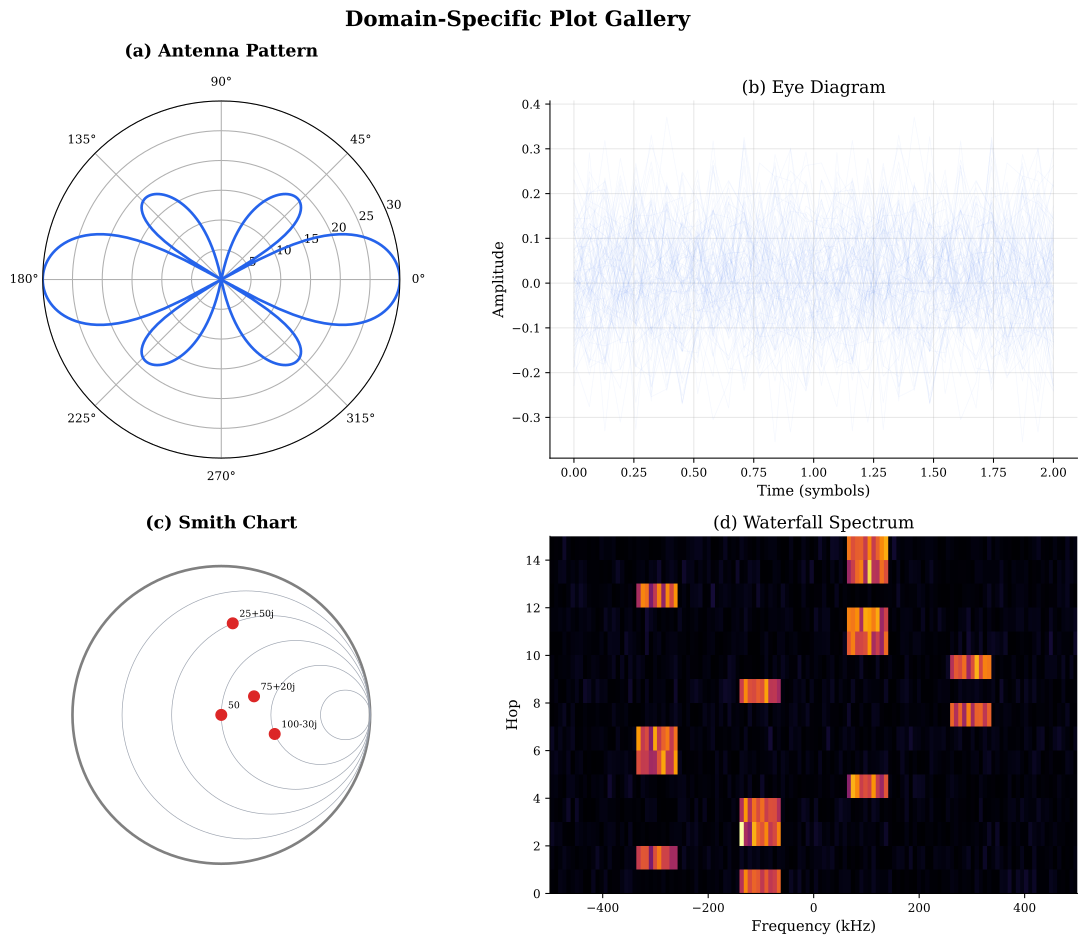
Domain-Specific Plot Types
| Plot Type | Shows | Axes | Library |
|---|---|---|---|
| Smith Chart | Impedance/reflection coefficient | Complex plane (unit disk) | scikit-rf |
| Eye Diagram | ISI, timing jitter, noise margin | Time vs amplitude (overlaid) | Matplotlib |
| Polar Pattern | Antenna radiation pattern | Angle vs gain (dB) | Matplotlib polar |
| Waterfall | Spectrum over time | Frequency vs time | Matplotlib imshow |
| Constellation | Modulation symbol positions | I vs Q plane | Matplotlib scatter |
Why This Matters: Eye Diagrams in 5G NR
In 5G NR, eye diagrams are critical for verifying transmitter signal quality at the antenna port. The eye opening must exceed thresholds specified in 3GPP TS 38.101. Excessive ISI from digital-to-analog converter (DAC) impairments or PA nonlinearity closes the eye, increasing EVM beyond the allowed limit.
Common Mistake: Polar Plot Angle Units
Mistake:
Passing angles in degrees to ax.plot(theta, r) on a polar axes.
Matplotlib polar axes expect radians.
Correction:
Convert degrees to radians: ax.plot(np.radians(theta_deg), r).
Quick Check
What does a 'closed eye' in an eye diagram indicate?
Low noise
Perfect channel equalization
Severe inter-symbol interference (ISI)
High data rate
When the eye closes, traces from adjacent symbols overlap, making reliable bit decisions impossible.
Historical Note: The Smith Chart (1939)
1939Phillip Hagar Smith invented the Smith chart in 1939 while working at Bell Labs. Before computers, RF engineers used the Smith chart as a graphical calculator for impedance matching and transmission line analysis. Despite modern simulation tools, the Smith chart remains the standard visualization for S-parameters and impedance data in RF engineering.
Historical Note: Eye Diagram Origins
1960sEye diagrams emerged from oscilloscope measurements in the 1960s at Bell Labs. Engineers triggered the oscilloscope at the symbol rate and overlaid thousands of traces. The resulting pattern resembled a human eye, giving the technique its name. Today, digital oscilloscopes and simulation software generate eye diagrams automatically.
Smith Chart
A graphical representation of the complex reflection coefficient plane, used for impedance matching and S-parameter visualization in RF engineering.
Eye Diagram
A visualization created by overlaying many consecutive symbol periods of a signal, revealing ISI, noise margin, and timing jitter.
Inter-Symbol Interference (ISI)
Distortion where energy from one symbol period leaks into adjacent symbol periods, caused by multipath or band-limited channels.