Matplotlib + LaTeX
Why Integrate Matplotlib with LaTeX
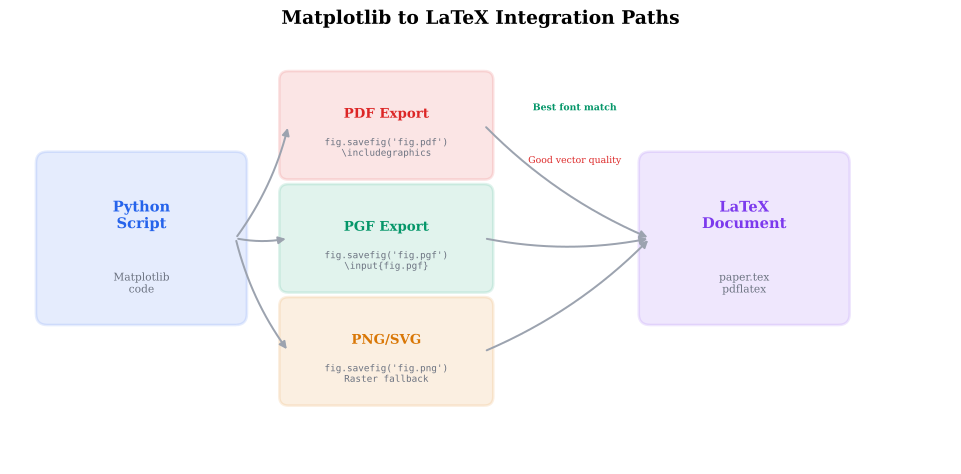
When you embed a Matplotlib figure in a LaTeX paper, font mismatches are jarring — the figure uses Helvetica while the paper uses Computer Modern. The solution is to configure Matplotlib to use the same fonts as your LaTeX document. The PGF backend goes further: it generates TeX commands that LaTeX renders natively, guaranteeing perfect font matching.
Definition: mathtext vs. usetex
mathtext vs. usetex
Matplotlib supports two math rendering engines:
mathtext (built-in, no LaTeX needed):
ax.set_xlabel(r' (dB)') # renders internally
Covers most math symbols but not all LaTeX packages.
usetex (requires LaTeX installation):
plt.rcParams['text.usetex'] = True
plt.rcParams['text.latex.preamble'] = r'\usepackage{amsmath}'
ax.set_xlabel(r' (dB)') # rendered by LaTeX
Gives access to the full LaTeX ecosystem including custom fonts and packages.
usetex=True is slower (spawns a LaTeX process per figure) but
produces typographically perfect output.
Definition: The PGF Backend
The PGF Backend
The PGF backend generates .pgf files containing TeX drawing commands.
When included in a LaTeX document with \input{figure.pgf}, the
figure is rendered by LaTeX itself:
import matplotlib
matplotlib.use('pgf')
import matplotlib.pyplot as plt

plt.rcParams.update({
    'pgf.texsystem': 'pdflatex',
    'font.family': 'serif',
    'pgf.preamble': r'\usepackage{amsmath}\usepackage{siunitx}',
})
Advantages: perfect font matching, native LaTeX rendering. Disadvantage: no interactive display.
Definition: Font Configuration for LaTeX Documents
Font Configuration for LaTeX Documents
Common font configurations for journal papers:
# Computer Modern (LaTeX default)
plt.rcParams.update({
    'font.family': 'serif',
    'font.serif': ['Computer Modern Roman'],
    'text.usetex': True,
})

# Times (IEEE style)
plt.rcParams.update({
    'font.family': 'serif',
    'font.serif': ['Times New Roman'],
    'text.usetex': True,
    'text.latex.preamble': r'\usepackage{mathptmx}',
})
Theorem: Font Matching Principle
For a figure to look native in a LaTeX document, two conditions must be met:
- Same font family — the figure's text font must match the document's body font (e.g., both use Computer Modern).
- Same font size — if the document uses 10pt and the figure is included at 100% scale, the figure's text must also be 10pt.
If either condition fails, the reader perceives the figure as "foreign" — a dead giveaway of a lazily prepared paper.
Think of it as dressing for an occasion — the figure should wear the same outfit as the document.
Example: Figure with LaTeX Rendering
Create a figure with LaTeX-rendered labels using usetex=True.
Implementation
import numpy as np
import matplotlib.pyplot as plt
plt.rcParams.update({
'text.usetex': True,
'font.family': 'serif',
'font.size': 10,
'figure.figsize': (3.5, 2.5),
})
x = np.linspace(0, 10, 200)
y = np.sinc(x)
fig, ax = plt.subplots()
ax.plot(x, y, color='#2563EB', lw=1.5)
ax.set_xlabel(r'')
ax.set_ylabel(r'')
ax.set_title(r'The Function')
ax.grid(True, alpha=0.3)
fig.savefig('sinc_usetex.pdf', bbox_inches='tight')
Example: Generating a PGF Figure
Generate a .pgf file that can be \input directly in a LaTeX document.
Implementation
import matplotlib
matplotlib.use('pgf')
import matplotlib.pyplot as plt
plt.rcParams.update({
'pgf.texsystem': 'pdflatex',
'font.family': 'serif',
'font.size': 10,
'pgf.preamble': r'\usepackage{amsmath}',
})
fig, ax = plt.subplots(figsize=(3.5, 2.5))
ax.plot([0, 1, 2], [0, 1, 0], 'o-')
ax.set_xlabel(r'')
ax.set_ylabel(r'')
fig.savefig('impulse_response.pgf')
In LaTeX
\begin{figure}
  \centering
  \input{impulse_response.pgf}
  \caption{Impulse response of the filter.}
\end{figure}
Example: Using siunitx for Physical Units
Use the LaTeX siunitx package in figure labels for proper unit
formatting.
Implementation
plt.rcParams.update({
'text.usetex': True,
'text.latex.preamble': r'\usepackage{siunitx}',
})
ax.set_xlabel(r'Frequency (\si{\giga\hertz})')
ax.set_ylabel(r'Power (\si{\deci\bel\metre})')
ax.set_title(r'Spectrum at ')
Font and Rendering Comparison
Compare how the same equation looks with mathtext vs. different LaTeX font packages.
Parameters
Matplotlib-LaTeX Integration Workflow
Common Mistake: usetex Is Slow
Mistake:
Enabling text.usetex=True globally during interactive development.
Each figure now spawns a LaTeX subprocess, adding seconds per render.
Correction:
Only enable usetex=True in the final figure-generation script.
Use mathtext during development. Alternatively, use the PGF backend
only in the production pipeline.
Common Mistake: Backslash Escaping in LaTeX Strings
Mistake:
Using regular strings instead of raw strings for LaTeX:
ax.set_xlabel('') — the \a is interpreted as a bell character.
Correction:
Always use raw strings: ax.set_xlabel(r'').
Quick Check
What is the main advantage of the PGF backend over saving as PDF?
Smaller file sizes
LaTeX renders the text natively, guaranteeing perfect font matching
Faster rendering
Supports interactive plots
PGF files contain TeX commands, so LaTeX uses its own fonts and rendering engine.
Key Takeaway
Match your figure fonts to your document fonts. Use usetex=True
with the same LaTeX preamble as your paper. For perfect integration,
use the PGF backend and \input{figure.pgf} in your LaTeX source.
Historical Note: PGF and TikZ
2005Till Tantau created PGF (Portable Graphics Format) and TikZ in 2005 as part of his PhD thesis at the University of Lubeck. Originally designed for creating diagrams in beamer presentations, PGF/TikZ became the de facto standard for programmatic graphics in LaTeX documents. Matplotlib's PGF backend leverages this by generating PGF drawing commands that LaTeX processes natively.
PGF (Portable Graphics Format)
A TeX macro package for creating vector graphics using drawing commands that LaTeX renders natively.
usetex
A Matplotlib setting that delegates text rendering to an external LaTeX installation, enabling full LaTeX feature support.
mathtext
Matplotlib's built-in math rendering engine that handles common LaTeX math without requiring a LaTeX installation.