Tools and Reproducibility
The Reproducibility Crisis in Wireless Research
A 2019 survey of IEEE wireless communications papers found that fewer than 5% provided source code, and fewer than 20% specified enough simulation parameters for independent replication. This is a problem: if results cannot be reproduced, they cannot be trusted or built upon.
Reproducibility requires three things:
- Complete parameter specification (Section 34.2)
- Available code (or at least algorithmic pseudocode)
- Documented toolchain (software versions, libraries, seeds)
This section surveys the standard tools used in wireless research and describes best practices for reproducible simulations.
MATLAB vs. Python for Wireless Simulations
Both MATLAB and Python are widely used in wireless research. The choice depends on your group's conventions and the task at hand.
| Criterion | MATLAB | Python (NumPy/SciPy) |
|---|---|---|
| Matrix operations | Native, concise syntax | NumPy @ operator, similar |
| Complex numbers | Native support | Native in NumPy |
| Plotting | Built-in, publication quality | Matplotlib (requires setup) |
| Communications toolbox | Comprehensive (modems, codes) | sionna, commpy, or custom |
| Optimization solvers | CVX, fmincon | CVXPY, SciPy.optimize |
| Deep learning | Deep Learning Toolbox | PyTorch, TensorFlow (dominant) |
| Speed | JIT-compiled, fast for loops | Vectorize or use Numba/JAX |
| Cost | Commercial license | Free and open source |
| Collaboration | Less common on GitHub | Dominant on GitHub |
| Reproducibility | .m files, limited packaging |
pip, conda, Docker |
Recommendation: Use whichever tool your collaborators use. For new projects with deep learning components, Python is the de facto standard. For quick link-level BER simulations, MATLAB remains highly productive.
Key Libraries and Frameworks
MATLAB ecosystem:
- Communications Toolbox: modulators, channel models, LDPC/turbo codecs
- Phased Array System Toolbox: antenna patterns, beamforming
- 5G Toolbox: NR waveform generation, PDSCH/PUSCH processing
- CVX: disciplined convex programming
Python ecosystem:
- NumPy / SciPy: core numerical computing
- Matplotlib: publication-quality figures
- sionna (NVIDIA): GPU-accelerated link-level simulator with differentiable components
- commpy: basic modulation, coding, channel models
- CVXPY: convex optimization modeling
- PyTorch / TensorFlow: deep learning for communications
- QuaDRiGa (MATLAB/Octave with Python wrapper): 3GPP-compliant channel generation
System-level simulators:
- Vienna 5G SLS (MATLAB): multi-cell, multi-user system simulation
- ns-3 (C++/Python): network-level protocol simulation
- MATLAB 5G Toolbox system-level examples
When reporting results, always specify: tool name, version number, and any non-default settings.
End-to-End Simulation Pipeline
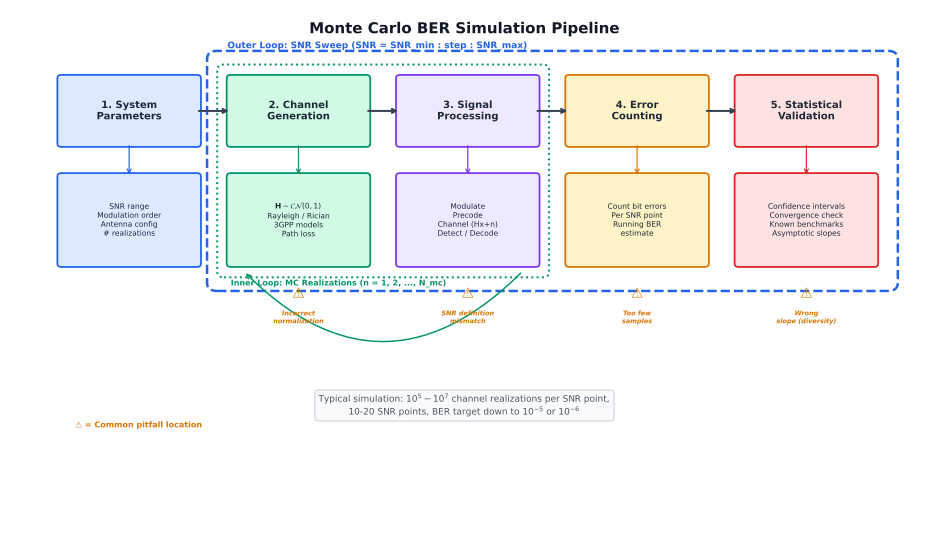
Building a Simulation Pipeline
A well-structured simulation separates concerns into modular stages:
1. Configuration
- All parameters in a single config file (JSON, YAML, or
.mat) - Random seed set once at the top level
- Output directory with timestamp
2. Channel generation
- Independent module that returns channel matrices
- Supports multiple models (Rayleigh, Rician, 3GPP)
- Saves channels for reproducibility (or saves the seed)
3. Signal processing chain
- Transmitter: encoding modulation precoding
- Channel:
- Receiver: combining detection decoding
4. Measurement
- Count errors (BER, BLER) or compute metrics (rate, MSE)
- Accumulate statistics across realizations
- Compute confidence intervals
5. Post-processing
- Save raw results (not just plots)
- Generate figures with proper labels, legends, and axis scales
- Log: date, code version (git hash), parameters, runtime
The key principle: anyone should be able to reproduce your figures by running a single command.
Publication-Quality Figures
Figures are the most scrutinized part of a paper. Follow these guidelines:
Axes and labels:
- Always label both axes with units
- Use " (dB)" not just "SNR"
- Log scale for BER (-axis), linear for rate
- Start BER plots at or , not at an arbitrary value
Lines and markers:
- Use distinct line styles (solid, dashed, dotted) and markers
- Ensure the figure is readable in grayscale (not just color)
- Analytical curves: solid lines without markers
- Simulation points: markers (possibly with connecting lines)
- When analytical and simulation agree, show both to validate
Legends and annotations:
- Place legend outside the plot or in a clear region
- Label curves directly when possible (less clutter than a legend)
- Annotate key features (crossing points, asymptotic slopes)
Technical details:
- Vector formats (PDF, EPS) for line plots, not raster (PNG, JPEG)
- Font size in figures should match the paper body text
- Use consistent notation between equations and figure labels
LaTeX Best Practices for Wireless Papers
Document class: IEEE papers use IEEEtran; journals and
conferences have specific templates.
Math conventions:
- Vectors in bold lowercase:
\mathbf{h} - Matrices in bold uppercase:
\mathbf{H} - Sets in calligraphic:
\mathcal{S} - Use
\text{SNR}notSNRin equations (upright font for acronyms)
Common packages:
amsmath,amssymb: essential math environmentsbm: bold math symbols (\bm{\theta})algorithm2eoralgorithmicx: pseudocodebooktabs: professional tables (\toprule,\midrule)siunitx: consistent unit formattingtikz/pgfplots: programmatic figures
Bibliography: Use BibTeX with the IEEE bibliography style. Check that all references have complete metadata (year, volume, pages). ArXiv preprints should include the arXiv ID.
Reproducibility Checklist
Before submitting a paper, verify the following:
Code and data:
- [ ] All simulation code is version-controlled (git)
- [ ] A
READMEexplains how to run the simulations - [ ] Dependencies are specified (versions!)
- [ ] Raw result data is saved (not just figures)
- [ ] Random seeds are recorded for every experiment
Paper:
- [ ] All simulation parameters are listed in a table
- [ ] SNR definition is stated explicitly
- [ ] Channel model is fully specified
- [ ] Number of Monte Carlo realizations is stated
- [ ] Baseline implementations are described or cited
- [ ] Complexity comparison is included
- [ ] Code availability statement is present
Validation:
- [ ] Analytical results match simulation where applicable
- [ ] Known limiting cases are verified (e.g., SISO, )
- [ ] Results are stable under different random seeds
- [ ] Confidence intervals confirm statistical significance
Many top venues (IEEE TSP, TWC) now encourage or require reproducible research. The IEEE Signal Processing Society's Reproducible Research initiative provides guidelines and badges.
Version Control for Research Code
Every wireless researcher should use git for simulation code. Key practices:
- Commit early, commit often: Each experiment should be a tagged commit so you can trace any figure back to exact code.
- Branch for experiments: Create a branch for each new idea; merge to main only when validated.
- Tag submissions:
git tag submission-v1when you submit a paper. This makes camera-ready revisions traceable. - Never hard-code parameters: Use config files that are committed alongside the code.
- Include plotting scripts: The exact script that generates each figure should be in the repository.
.gitignoredata files: Large data and binary files should not be in git; use git-LFS or external storage.
The combination of a git hash in your paper's simulation section and a publicly available repository is the gold standard for reproducibility.
Quick Check
Which of the following is the LEAST important for reproducing a wireless simulation result?
The exact random seed used
The operating system used (e.g., Windows vs. Linux)
The SNR definition and noise normalization
The number of Monte Carlo trials
While minor floating-point differences can occur across platforms, the OS is the least critical factor. Correct parameters, channel models, and algorithm implementations matter far more than the OS.