Decorators
Why Decorators Are Everywhere in Scientific Python
Open any serious scientific Python project and you will find decorators:
@jit— Numba JIT compilation@torch.no_grad()— disable gradient tracking in PyTorch@pytest.mark.parametrize— parameterized testing@app.route("/api/predict")— Flask/FastAPI endpoint@functools.lru_cache— memoization
Decorators are the mechanism behind all of these. Once you understand
how they work, you can write your own @timer, @cache_result,
@validate_shapes, and @retry decorators for your research code.
Definition: Decorator
Decorator
A decorator is a callable that takes a function as input and returns
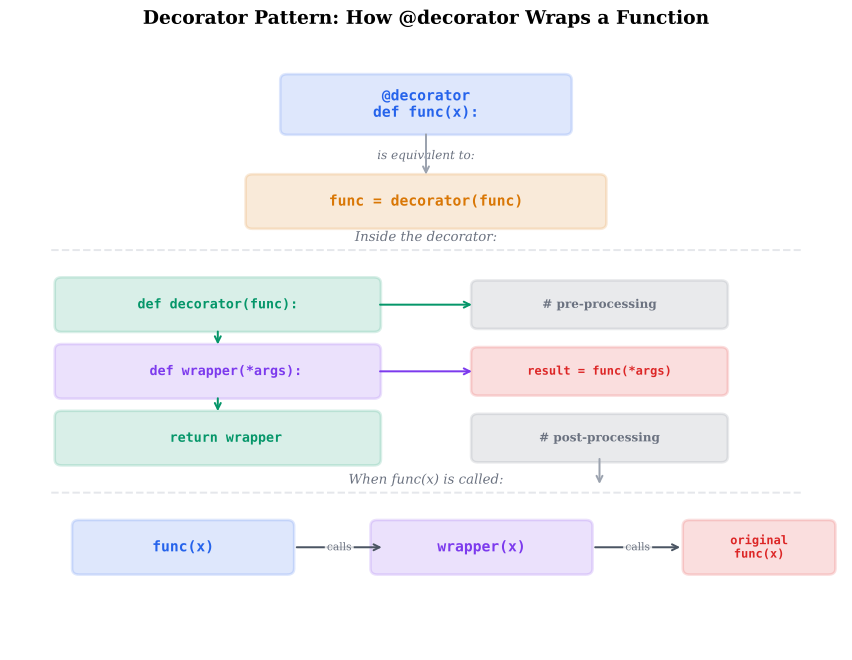
a modified (or replaced) function. The @ syntax is syntactic sugar:
@decorator
def func():
    ...

# is exactly equivalent to:
def func():
    ...
func = decorator(func)
Most decorators are functions that return a wrapper function (a closure that calls the original). The wrapper can add behavior before, after, or around the original function call.
Definition: Decorator Factory (Decorator with Arguments)
Decorator Factory (Decorator with Arguments)
A decorator factory is a function that returns a decorator. This adds one more level of nesting to accept configuration arguments:
def repeat(n: int):                 # decorator factory
    def decorator(func):            # actual decorator
        @functools.wraps(func)
        def wrapper(*args, **kwargs):  # wrapper
            for _ in range(n):
                result = func(*args, **kwargs)
            return result
        return wrapper
    return decorator

@repeat(n=3)
def greet(name):
    print(f"Hello, {name}!")

greet("World")  # prints 3 times
The call chain is: repeat(3) returns decorator, then
decorator(greet) returns wrapper.
Definition: functools.wraps — Preserving Function Metadata
functools.wraps — Preserving Function Metadata
Without @functools.wraps, a decorated function loses its original
__name__, __doc__, and __module__:
def timer(func):
    def wrapper(*args, **kwargs):
        ...
    return wrapper

@timer
def simulate():
    """Run a Monte Carlo simulation."""
    ...

print(simulate.__name__)  # 'wrapper'  (wrong!)
print(simulate.__doc__)   # None       (wrong!)
Adding @functools.wraps(func) to the wrapper copies the original
function's metadata:
import functools

def timer(func):
    @functools.wraps(func)
    def wrapper(*args, **kwargs):
        ...
    return wrapper

@timer
def simulate():
    """Run a Monte Carlo simulation."""
    ...

print(simulate.__name__)  # 'simulate' (correct!)
print(simulate.__doc__)   # 'Run a Monte Carlo simulation.' (correct!)
Example: Building a @timer Decorator
Write a @timer decorator that measures and logs the execution time
of any function. It should work with any signature and preserve
the original function's metadata.
Basic implementation
import functools
import time

def timer(func):
    """Decorator that prints execution time."""
    @functools.wraps(func)
    def wrapper(*args, **kwargs):
        start = time.perf_counter()
        result = func(*args, **kwargs)
        elapsed = time.perf_counter() - start
        print(f"{func.__name__} took {elapsed:.4f}s")
        return result
    return wrapper

@timer
def train_model(X, y, epochs=100):
    """Train a simple model."""
    # ... training logic ...
    time.sleep(0.5)
    return {"loss": 0.01}

result = train_model(X_train, y_train, epochs=50)
# Output: train_model took 0.5003s
Enhanced version with logging
import logging

def timer(func=None, *, logger=None, level=logging.INFO):
    """Timer decorator with optional logger.

    Can be used as @timer or @timer(logger=my_logger).
    """
    if func is None:
        # Called with arguments: @timer(logger=...)
        return lambda f: timer(f, logger=logger, level=level)

    log = logger or logging.getLogger(func.__module__)

    @functools.wraps(func)
    def wrapper(*args, **kwargs):
        start = time.perf_counter()
        result = func(*args, **kwargs)
        elapsed = time.perf_counter() - start
        log.log(level, f"{func.__name__} took {elapsed:.4f}s")
        return result
    return wrapper
Example: Building a @cache_result Decorator
Build a @cache_result decorator that memoizes function results
based on input arguments. Handle NumPy arrays by hashing their
contents (since arrays are not hashable by default).
Implementation with array support
import functools
import hashlib
import numpy as np

def cache_result(func):
    """Memoization decorator that handles NumPy arrays."""
    cache = {}

    def _make_key(args, kwargs):
        """Create a hashable key from args/kwargs."""
        key_parts = []
        for arg in args:
            if isinstance(arg, np.ndarray):
                key_parts.append(hashlib.sha256(arg.tobytes()).hexdigest())
            else:
                key_parts.append(arg)
        for k, v in sorted(kwargs.items()):
            if isinstance(v, np.ndarray):
                key_parts.append((k, hashlib.sha256(v.tobytes()).hexdigest()))
            else:
                key_parts.append((k, v))
        return tuple(key_parts)

    @functools.wraps(func)
    def wrapper(*args, **kwargs):
        key = _make_key(args, kwargs)
        if key not in cache:
            cache[key] = func(*args, **kwargs)
        return cache[key]

    wrapper.cache = cache
    wrapper.cache_clear = lambda: cache.clear()
    return wrapper

@cache_result
def compute_svd(matrix: np.ndarray):
    """Expensive SVD computation."""
    return np.linalg.svd(matrix)
Usage and cache inspection
A = np.random.randn(100, 100)

# First call — computes and caches
U, S, Vh = compute_svd(A)

# Second call — returns cached result
U2, S2, Vh2 = compute_svd(A)

print(len(compute_svd.cache))  # 1
compute_svd.cache_clear()      # free memory
Example: Building a @log_shape Decorator for NumPy
Write a @log_shape decorator that logs the shapes of NumPy array
inputs and outputs. This is invaluable for debugging shape
mismatches in deep pipelines.
Implementation
import functools
import numpy as np

def log_shape(func):
    """Log shapes of NumPy array arguments and return values."""
    @functools.wraps(func)
    def wrapper(*args, **kwargs):
        # Log input shapes
        for i, arg in enumerate(args):
            if isinstance(arg, np.ndarray):
                print(f"  {func.__name__} arg[{i}]: shape={arg.shape}, dtype={arg.dtype}")
        for name, val in kwargs.items():
            if isinstance(val, np.ndarray):
                print(f"  {func.__name__} {name}: shape={val.shape}, dtype={val.dtype}")

        result = func(*args, **kwargs)

        # Log output shape
        if isinstance(result, np.ndarray):
            print(f"  {func.__name__} -> shape={result.shape}, dtype={result.dtype}")
        elif isinstance(result, tuple):
            for i, r in enumerate(result):
                if isinstance(r, np.ndarray):
                    print(f"  {func.__name__} ->[{i}]: shape={r.shape}")

        return result
    return wrapper

@log_shape
def preprocess(X: np.ndarray, mean: np.ndarray) -> np.ndarray:
    return (X - mean) / X.std(axis=0)
Output example
X = np.random.randn(1000, 50)
mean = X.mean(axis=0)
result = preprocess(X, mean)
#   preprocess arg[0]: shape=(1000, 50), dtype=float64
#   preprocess arg[1]: shape=(50,), dtype=float64
#   preprocess -> shape=(1000, 50), dtype=float64
Anatomy of a Decorator
Common Mistake: Forgetting @functools.wraps
Mistake:
Writing a decorator without @functools.wraps(func):
def my_decorator(func):
    def wrapper(*args, **kwargs):
        return func(*args, **kwargs)
    return wrapper

@my_decorator
def important_function():
    """Critical computation."""
    ...

print(important_function.__name__)  # 'wrapper' — debugging nightmare
help(important_function)            # shows wrapper's (empty) docstring
This breaks introspection, Sphinx documentation, pytest discovery, and debugging.
Correction:
Always use @functools.wraps(func):
import functools

def my_decorator(func):
    @functools.wraps(func)
    def wrapper(*args, **kwargs):
        return func(*args, **kwargs)
    return wrapper
Common Mistake: Decorator Stacking Order
Mistake:
Misunderstanding the order of decorator application:
@decorator_a
@decorator_b
def func():
    ...
Many assume decorator_a runs first, but the application order is
bottom-up: func = decorator_a(decorator_b(func)).
The execution order of wrappers is top-down (a's wrapper runs first, then b's wrapper, then the original function).
Correction:
Think of stacked decorators like function composition:
- Application (definition time): bottom-up
- Execution (call time): top-down (outermost wrapper first)
@timer          # 2nd applied, 1st to execute (outermost)
@log_shape      # 1st applied, 2nd to execute
def compute(X):
    ...

# Equivalent to: compute = timer(log_shape(compute))
# Call chain: timer.wrapper -> log_shape.wrapper -> compute
Theorem: Decorator Composition as Function Composition
Stacking decorators @d1, @d2, ..., @dn on a function f is
equivalent to the function composition .
The decorators are applied from innermost (closest to def) to
outermost. At call time, the wrapper chain executes from outermost
to innermost.
Each decorator wraps the result of the previous one, like nesting Russian dolls. When you call the function, you unwrap from the outside in.
Formal equivalence
@d1
@d2
@d3
def f(x):
    return x

# Step by step:
# 1. Define f
# 2. Apply d3: f = d3(f)   -> f is now d3's wrapper
# 3. Apply d2: f = d2(f)   -> f is now d2's wrapper around d3's
# 4. Apply d1: f = d1(f)   -> f is now d1's wrapper (outermost)
# This is: f = d1(d2(d3(f)))
Execution trace
def trace(name):
    def decorator(func):
        @functools.wraps(func)
        def wrapper(*args, **kwargs):
            print(f"Entering {name}")
            result = func(*args, **kwargs)
            print(f"Exiting {name}")
            return result
        return wrapper
    return decorator

@trace("A")
@trace("B")
def compute(x):
    print(f"Computing {x}")
    return x * 2

compute(5)
# Entering A
# Entering B
# Computing 5
# Exiting B
# Exiting A
Built-in Decorators: @staticmethod, @classmethod, @property
Python provides three built-in decorators for class methods:
class Experiment:
    _instances = []

    def __init__(self, name: str, params: dict):
        self.name = name
        self.params = params
        Experiment._instances.append(self)

    @staticmethod
    def validate_params(params: dict) -> bool:
        """No access to self or cls — a plain function in the class namespace."""
        return all(v > 0 for v in params.values())

    @classmethod
    def from_yaml(cls, path: str) -> 'Experiment':
        """Receives the class as first arg — used for alternative constructors."""
        import yaml
        with open(path) as f:
            config = yaml.safe_load(f)
        return cls(config['name'], config['params'])

    @property
    def num_params(self) -> int:
        """Accessed like an attribute, computed on the fly."""
        return len(self.params)

# Usage:
exp = Experiment.from_yaml("config.yaml")   # classmethod
Experiment.validate_params({"lr": 0.01})     # staticmethod
print(exp.num_params)                        # property (no parentheses)
Decorator Overhead Benchmark
Measure the overhead of different decorator patterns: simple wrapper, functools.wraps, lru_cache, and Numba @jit. See how decorator overhead compares to actual computation time for different workloads.
Parameters
Decorator Chain Execution Animation
Watch the step-by-step execution of a decorator chain. See how each wrapper's pre-processing and post-processing code executes as the call propagates through the chain and back.
Parameters
Production-Quality @timer Decorator
# Code from: ch02/python/timer_decorator.py
# Load from backend supplements endpoint@cache_result with NumPy Support
# Code from: ch02/python/cache_decorator.py
# Load from backend supplements endpoint@log_shape and @validate_shape Decorators
# Code from: ch02/python/shape_decorators.py
# Load from backend supplements endpointCommon Decorator Patterns Collection
# Code from: ch02/python/decorator_patterns.py
# Load from backend supplements endpointQuick Check
What is @decorator syntax equivalent to?
func = decorator(func)
decorator = func(decorator)
func.decorator = True
func = func(decorator)
func = decorator(func)The @decorator syntax is syntactic sugar for reassigning the function name to the result of calling the decorator.
Quick Check
Given:
@A
@B
@C
def f(x): ...
What is the equivalent explicit form?
f = C(B(A(f)))
f = A(B(C(f)))
f = A(f); f = B(f); f = C(f)
f = A(B(C))(f)
f = A(B(C(f)))Decorators are applied bottom-up: C first, then B, then A.
decorator
A callable that takes a function (or class) and returns a modified
version. Applied using the @decorator syntax above a function
definition. Most decorators use a wrapper closure to add behavior.
Related: closure, wrapper function
wrapper function
The inner function returned by a decorator that "wraps" the original
function, adding behavior before and/or after the call. Should use
@functools.wraps to preserve the original function's metadata.
Related: decorator
Historical Note: The Evolution of Python Decorators
2004-2008Decorators were introduced in Python 2.4 (2004) via PEP 318.
Before @ syntax, decorators had to be applied manually:
def my_func():
    ...
my_func = staticmethod(my_func)  # pre-PEP 318 style
Class decorators came later in Python 2.6 (2008) via PEP 3129.
The @ symbol was chosen after extensive community debate — alternatives
included |, [, and even <-. Guido van Rossum selected @ partly
because it was not used elsewhere in Python syntax.
Key Takeaway
Decorators add reusable cross-cutting behavior. Use @functools.wraps
in every decorator to preserve metadata. Stack decorators bottom-up
(innermost applied first). Use decorator factories when your decorator
needs configuration arguments. For scientific code, @timer,
@cache_result, and @log_shape are the most immediately useful patterns.