Debugging and Profiling
Finding Bugs and Bottlenecks
Debugging and profiling are complementary skills: debugging finds correctness problems ("why is the answer wrong?"), while profiling finds performance problems ("why is it slow?"). Scientific code often needs both — a correct but slow simulation is useless for sweeping over thousands of parameter combinations.
This section covers Python's built-in debugging and profiling tools, plus third-party tools that are essential for numerical code.
Definition: breakpoint() and the Python Debugger
breakpoint() and the Python Debugger
breakpoint() is a built-in function (PEP 553, Python 3.7) that
drops into the debugger at the call site:
def compute_weights(H, noise_var):
    W = np.linalg.inv(H.conj().T @ H + noise_var * np.eye(H.shape[1]))
    breakpoint()  # Execution pauses here
    return W @ H.conj().T
At the (Pdb) prompt, you can:
p variable— print a variablen— execute next lines— step into a functionc— continue executionl— list source code around current linepp H.shape— pretty-print an expression
Set PYTHONBREAKPOINT=ipdb.set_trace to use ipdb (IPython debugger)
for tab completion and syntax highlighting.
Definition: cProfile — Deterministic Profiling
cProfile — Deterministic Profiling
cProfile is Python's built-in profiler that records every function
call with its timing:
python -m cProfile -s cumtime my_simulation.py
Key columns in the output:
ncalls: number of times the function was calledtottime: time spent in the function (excluding subcalls)cumtime: cumulative time (including subcalls)percall: time per call
For programmatic use:
import cProfile
import pstats

profiler = cProfile.Profile()
profiler.enable()
result = run_simulation()
profiler.disable()

stats = pstats.Stats(profiler)
stats.sort_stats("cumulative")
stats.print_stats(20)  # Top 20 functions
Definition: line_profiler — Line-by-Line Profiling
line_profiler — Line-by-Line Profiling
line_profiler shows execution time for each line within a function:
# Install: pip install line_profiler

@profile  # Decorator recognized by kernprof
def estimate_channel(Y, X, n_pilots):
    H_ls = Y[:, :n_pilots] @ np.linalg.pinv(X[:n_pilots])  # Line 1
    H_smooth = moving_average(H_ls, window=5)                # Line 2
    return H_smooth                                           # Line 3
Run with: kernprof -l -v my_script.py
Output shows per-line timing:
Line #  % Time  Line Contents
     1    45.2%  H_ls = Y[:, :n_pilots] @ np.linalg.pinv(X[:n_pilots])
     2    54.6%  H_smooth = moving_average(H_ls, window=5)
     3     0.2%  return H_smooth
Definition: py-spy — Sampling Profiler
py-spy — Sampling Profiler
py-spy is a sampling profiler that attaches to a running Python
process without modifying code or adding overhead:
# Profile a running process
py-spy record -o profile.svg --pid 12345

# Profile a command
py-spy record -o profile.svg -- python my_simulation.py
It produces flame graphs — visual call stacks where the width
of each bar represents the fraction of time spent in that function.
Unlike cProfile, py-spy has near-zero overhead and can profile
C extensions and NumPy internals.
Historical Note: Python's Debugger Heritage
1994-2017Python's pdb module was included in the standard library from
Python 1.0 (1994), inspired by gdb (GNU Debugger). For 23 years,
entering the debugger required import pdb; pdb.set_trace().
PEP 553 (2017) introduced breakpoint() as a cleaner alternative,
also enabling the PYTHONBREAKPOINT environment variable to switch
debugger backends without changing code.
Example: Debugging a NaN Propagation Bug
A MIMO simulation produces NaN in the BER results for certain
SNR values. Use breakpoint() and NumPy diagnostics to find the root cause.
Add conditional breakpoint
def compute_ber(H, snr_linear, n_bits):
    noise_var = 1.0 / snr_linear
    W = np.linalg.inv(H.conj().T @ H + noise_var * np.eye(H.shape[1]))
    x_hat = W @ H.conj().T @ y

    if np.any(np.isnan(x_hat)):
        breakpoint()  # Only triggers when NaN appears

    errors = np.sum(decode(x_hat) != tx_bits)
    return errors / n_bits
Diagnose at the debugger prompt
(Pdb) p np.linalg.cond(H.conj().T @ H + noise_var * np.eye(H.shape[1]))
1.8e+17  # Extremely ill-conditioned!
(Pdb) p noise_var
1e-20    # Very high SNR -> tiny regularization -> near-singular
(Pdb) p H.shape
(4, 4)   # Square matrix, no overdetermination
Fix: add regularization floor
noise_var = max(1.0 / snr_linear, 1e-10) # Floor prevents singularity
Example: Profiling and Optimizing a Channel Estimation Pipeline
Profile a channel estimation function to find the bottleneck and optimize it for a 10x speedup.
Profile with cProfile
import cProfile

def profile_estimation():
    rng = np.random.default_rng(42)
    H = (rng.standard_normal((64, 16))
         + 1j * rng.standard_normal((64, 16))) / np.sqrt(2)
    Y = H @ rng.standard_normal((16, 100)) + 0.1 * rng.standard_normal((64, 100))

    cProfile.runctx(
        "for _ in range(100): estimate_channel(Y, H, 10)",
        globals(), locals()
    )
Identify bottleneck
ncalls  tottime  cumtime  function
   100   0.002    3.450   estimate_channel
   100   3.200    3.200   moving_average   # <-- bottleneck!
   100   0.240    0.240   linalg.pinv
Optimize the bottleneck
# Before: Python loop (3.2s)
def moving_average(H, window=5):
    result = np.zeros_like(H)
    for i in range(H.shape[1]):
        for j in range(H.shape[0]):
            start = max(0, j - window // 2)
            end = min(H.shape[0], j + window // 2 + 1)
            result[j, i] = np.mean(H[start:end, i])
    return result

# After: vectorized (0.3s)
from scipy.ndimage import uniform_filter1d
def moving_average(H, window=5):
    return uniform_filter1d(H, size=window, axis=0)
Profiling Comparison: Loop vs. Vectorized
Compare execution times of loop-based and vectorized implementations across different problem sizes.
Parameters
Python Project Structure
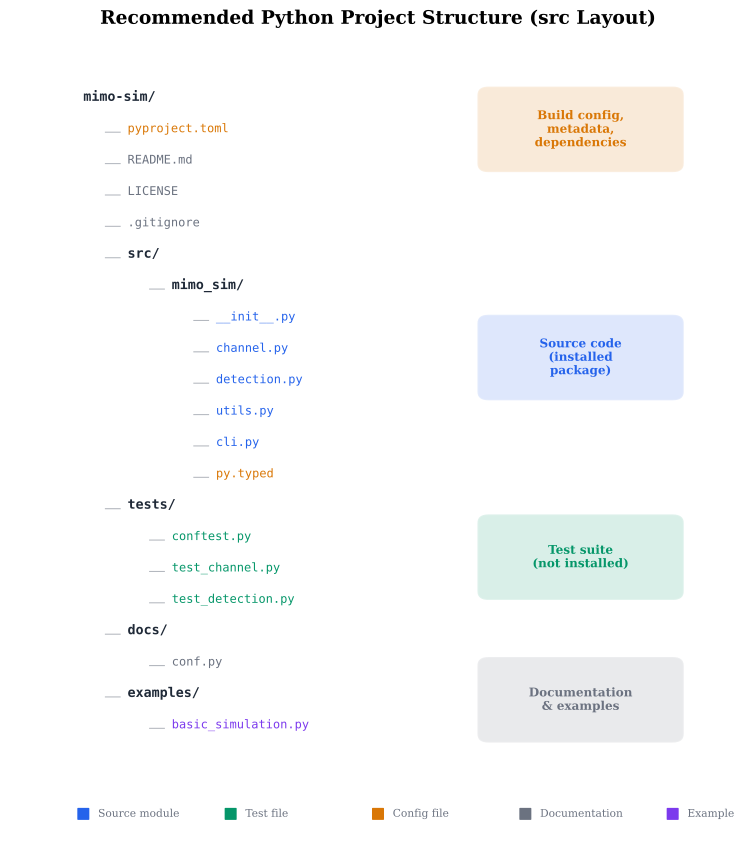
src layout for a scientific Python package, showing
the relationship between pyproject.toml, src/, tests/, and
the installed package.
Python Profiling Tools Compared
| Tool | Type | Overhead | Granularity | Use case |
|---|---|---|---|---|
cProfile | Deterministic | Moderate (2-5x) | Function-level | Find which functions are slow |
line_profiler | Deterministic | High (10-50x) | Line-level | Find which lines within a function are slow |
py-spy | Sampling | Near-zero (<1%) | Function-level | Profile production code, long-running jobs |
timeit | Benchmark | None (isolated) | Statement-level | Micro-benchmark a single expression |
time.perf_counter | Manual | None | Block-level | Time a specific code block |
Common Mistake: Optimizing Without Profiling
Mistake:
Rewriting code for performance based on intuition rather than data: "I bet the FFT is the bottleneck, let me optimize it."
Correction:
Always profile first. The bottleneck is usually not where you think:
python -m cProfile -s cumtime my_script.py | head -20
The top functions by cumtime are the actual bottlenecks.
Optimizing the wrong function wastes time and often makes
code harder to read for no benefit.
Quick Check
What does setting PYTHONBREAKPOINT=0 do?
Enables the debugger at every line
Disables all breakpoint() calls — they become no-ops
Sets the breakpoint to line 0
Uses the default pdb debugger
Setting PYTHONBREAKPOINT=0 causes breakpoint() to do nothing, useful for production.
Profiling Patterns
# Code from: ch04/python/profiling_demo.py
# Load from backend supplements endpoint