ndarray Internals
Why Understanding ndarray Internals Matters
NumPy arrays feel like Python lists at first glance, but their power comes from a radically different memory model. Understanding how data is laid out in memory, what strides are, and when you get a view vs a copy is the difference between code that runs in milliseconds and code that takes minutes.
This section peels back the abstraction to show you the raw machinery
inside every np.ndarray.
Definition: The ndarray Object
The ndarray Object
An np.ndarray is a fixed-size, homogeneous, n-dimensional container
for numerical data. Every ndarray consists of:
- A data buffer — a contiguous block of raw bytes in memory
- A dtype — specifies how to interpret each element (e.g.,
float64= 8 bytes) - A shape — tuple of axis lengths, e.g.,
(3, 4)means 3 rows, 4 columns - Strides — tuple of byte steps to advance along each axis
import numpy as np
a = np.array([[1.0, 2.0, 3.0],
              [4.0, 5.0, 6.0]], dtype=np.float64)
print(a.shape)    # (2, 3)
print(a.dtype)    # float64
print(a.strides)  # (24, 8) — 24 bytes to next row, 8 bytes to next column
print(a.nbytes)   # 48 — total bytes = 2 * 3 * 8
Definition: C-Contiguous vs Fortran-Contiguous
C-Contiguous vs Fortran-Contiguous
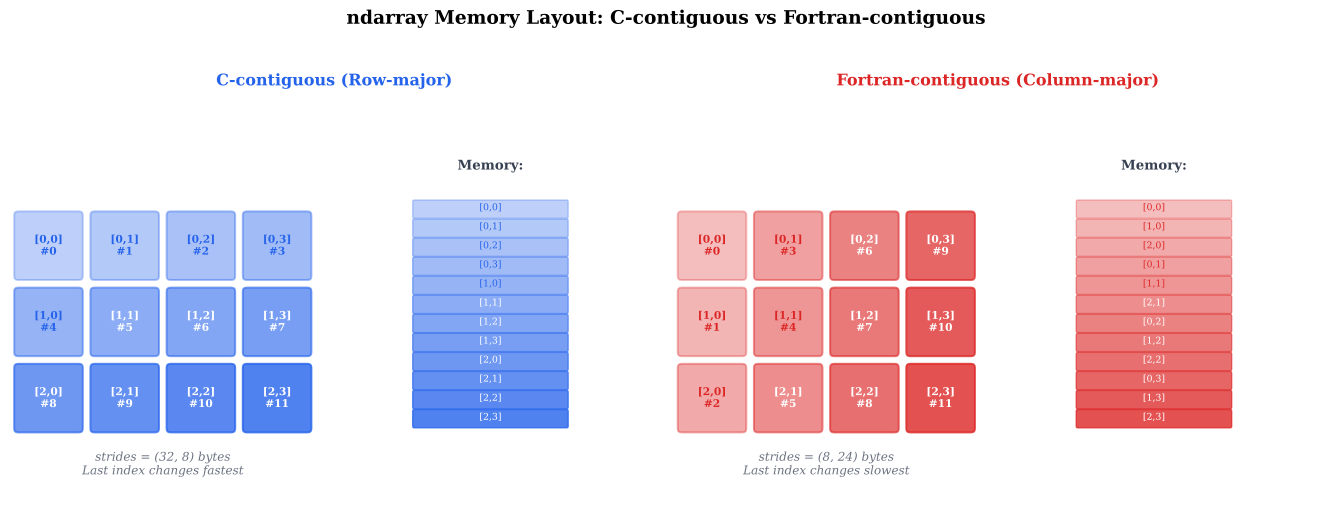
C-contiguous (row-major): elements in each row are stored consecutively. The last index changes fastest. This is NumPy's default.
Fortran-contiguous (column-major): elements in each column are stored consecutively. The first index changes fastest. Used by MATLAB and Fortran.
c = np.array([[1, 2, 3], [4, 5, 6]], order='C')
f = np.array([[1, 2, 3], [4, 5, 6]], order='F')

print(c.strides)  # (24, 8)  — row-major
print(f.strides)  # (8, 16)  — column-major

print(c.flags['C_CONTIGUOUS'])  # True
print(f.flags['F_CONTIGUOUS'])  # True
The memory layout affects cache performance: iterate along contiguous axes for speed.
Definition: Strides
Strides
Strides is a tuple of integers telling NumPy how many bytes to skip in memory to advance one position along each axis.
For a 2-D array with shape (m, n) and dtype float64 (8 bytes):
- C-contiguous:
strides = (n * 8, 8)— skip an entire row to go down, skip 8 bytes to go right - F-contiguous:
strides = (8, m * 8)— skip 8 bytes to go down, skip an entire column to go right
Strides enable views without copying: slicing just changes the strides and the starting pointer.
a = np.arange(12, dtype=np.float64).reshape(3, 4)
print(a.strides)       # (32, 8)
print(a[::2].strides)  # (64, 8) — every other row, stride doubled
print(a[:, ::2].strides)  # (32, 16) — every other column
Definition: View vs Copy
View vs Copy
A view shares the same data buffer as the original array. Modifying the view modifies the original. A copy allocates a new data buffer.
Rules of thumb:
| Operation | Result |
|---|---|
Basic slicing: a[1:3], a[::2] |
View |
Transpose: a.T |
View |
Reshape (when possible): a.reshape(...) |
View |
Fancy indexing: a[[0, 2, 4]] |
Copy |
Boolean indexing: a[mask] |
Copy |
a.copy() |
Copy |
Use np.shares_memory(a, b) to check at runtime:
a = np.arange(10)
b = a[::2]           # view
c = a[[0, 2, 4]]     # copy

print(np.shares_memory(a, b))  # True
print(np.shares_memory(a, c))  # False
Definition: Data Types (dtype)
Data Types (dtype)
Every ndarray element has the same dtype. Common scientific dtypes:
| dtype | Size | Range / Precision |
|---|---|---|
float32 |
4 B | ~7 decimal digits, |
float64 |
8 B | ~16 decimal digits, |
complex64 |
8 B | Two float32 (real + imag) |
complex128 |
16 B | Two float64 (real + imag) |
int32 |
4 B | to |
int64 |
8 B | to |
bool_ |
1 B | True / False |
a = np.array([1.0, 2.0, 3.0])       # default float64
b = a.astype(np.float32)             # downcast: saves memory
c = np.array([1+2j, 3+4j])           # complex128
print(c.real.dtype)                   # float64
Rule: use float64 unless memory or GPU constraints force float32.
Theorem: Stride Computation Formula
For a C-contiguous array with shape and element size bytes, the stride along axis is:
In particular, the last axis always has stride , and the first axis has the largest stride.
To move one step along axis , you must skip over all elements in the remaining axes — that is, elements, each of size bytes.
Think of a 3-D array as a book: axis 0 = page, axis 1 = row on page, axis 2 = column.
Base case
The last axis () has stride . Moving one element along the last axis means moving bytes.
Inductive step
Assume stride for axis is . Axis must skip over elements of axis , so .
Theorem: View vs Copy Rule
A NumPy operation produces a view if and only if the result can be
described by the same data buffer with a different combination of
(offset, shape, strides). Otherwise, it must produce a copy.
Basic slicing with start:stop:step can always be expressed as new
strides (multiply by step) and new shape (number of selected elements).
Fancy indexing with an arbitrary list of indices cannot be expressed as
a regular stride pattern, so NumPy must allocate new memory.
Theorem: Row-Major Iteration is Cache-Friendly
For a C-contiguous array, iterating over the last axis first (innermost loop) accesses memory sequentially and maximizes CPU cache utilization. Iterating over the first axis first causes cache misses.
Modern CPUs load data in cache lines (typically 64 bytes = 8 float64s). Sequential access loads a full cache line and uses every element. Strided access may load a cache line but use only one element before evicting it.
Example: Strides Under Slicing
Given a = np.arange(24, dtype=np.float64).reshape(4, 6), compute the
strides and shape of b = a[::2, 1::3] without running the code.
Original strides
a has shape (4, 6) with float64 (8 bytes).
C-contiguous strides: .
Row slicing a[::2]
Step 2 along axis 0: new stride = . New shape along axis 0: .
Column slicing [:, 1::3]
Start at index 1, step 3 along axis 1: new stride = . New shape along axis 1: .
Result
b.shape = (2, 2), b.strides = (96, 24).
b is a view: np.shares_memory(a, b) returns True.
Example: C vs Fortran Order Performance
Create a large matrix in both C and Fortran order. Sum along rows (axis 1) and along columns (axis 0). Which is faster for each order?
Setup and benchmark
import time
n = 5000
c_arr = np.random.randn(n, n)                     # C-order
f_arr = np.asfortranarray(c_arr)                   # F-order

# Sum along axis 1 (row sums) — accesses contiguous in C-order
t0 = time.perf_counter()
_ = c_arr.sum(axis=1)
print(f"C-order, row sum: {time.perf_counter()-t0:.4f}s")

t0 = time.perf_counter()
_ = f_arr.sum(axis=1)
print(f"F-order, row sum: {time.perf_counter()-t0:.4f}s")
# C-order is faster for row sums (contiguous access)
# F-order is faster for column sums (contiguous access)
Memory Layout Explorer
Visualize how ndarray elements are stored in memory for different shapes, dtypes, and memory orders. See strides, contiguity flags, and the raw byte layout.
Parameters
ndarray Memory Layout
Historical Note: From Numeric to NumPy
2005NumPy traces its lineage to Numeric (1995), one of the first array libraries for Python, created by Jim Hugunin. A competing library, Numarray, offered better support for large arrays. In 2005, Travis Oliphant unified both into NumPy, which became the foundation of the entire scientific Python ecosystem. The C-contiguous default was inherited from Numeric's C implementation.
Historical Note: Row-Major vs Column-Major: A Language War
1950s-1970sC and its descendants (C++, Python/NumPy) use row-major order. Fortran, MATLAB, R, and Julia use column-major order. This split dates back to the 1950s: Fortran's array layout was optimized for the IBM 704's memory architecture. When Dennis Ritchie designed C in the 1970s, he chose the opposite convention for consistency with pointer arithmetic and multi-dimensional array decay.
Quick Check
For a C-contiguous float64 array with shape (3, 5), what are
the strides in bytes?
(40, 8)
(8, 40)
(24, 8)
(8, 8)
Stride for axis 0: 5 * 8 = 40; stride for axis 1: 8.
Common Mistake: Accidental Mutation Through Views
Mistake:
Modifying a slice without realizing it is a view, which silently changes the original array:
a = np.arange(10)
b = a[3:7]
b[:] = 0       # a is now [0, 1, 2, 0, 0, 0, 0, 7, 8, 9]!
Correction:
Use .copy() explicitly when you need an independent array:
b = a[3:7].copy()
b[:] = 0       # a is unchanged
Common Mistake: Assuming Fancy Indexing Creates a View
Mistake:
Assigning through fancy indexing and expecting the original to update in a view-like manner:
a = np.arange(10)
b = a[[1, 3, 5]]     # COPY, not view
b[0] = 99             # a is unchanged!
Correction:
To modify elements via fancy indexing, assign directly to the original:
a[[1, 3, 5]] = [99, 99, 99] # modifies a directly
ndarray
NumPy's core data structure: a fixed-size, homogeneous, n-dimensional array with a contiguous memory buffer.
Related: Data Types (dtype), Strides, Shape
stride
The number of bytes to step in memory to advance one position along a given axis of an ndarray.
Related: view, Contiguity and Stride Formula
view
An ndarray that shares its data buffer with another array. Modifications to the view are reflected in the original.
Related: Zero-Copy NumPy <-> PyTorch Conversion, Shares Memory
contiguous
An array whose elements are stored in a single unbroken block of memory, without gaps or out-of-order elements.
Related: C Contiguous, Fortran Contiguous
ndarray Internals
# Code from: ch05/python/ndarray_internals.py
# Load from backend supplements endpointWhy This Matters: GPU Arrays Use the Same Memory Model
CuPy and PyTorch tensors adopt the same concepts: contiguous memory
buffers, strides, dtypes, and views. Understanding ndarray internals
transfers directly to GPU programming. In Chapter 12, you will use
tensor.is_contiguous() and tensor.stride() — the same mental
model applies.
See full treatment in Chapter 12
Key Takeaway
Basic slicing (a[::2], a[1:5]) creates views; fancy indexing
(a[[0,2,4]]) and boolean indexing (a[mask]) create copies.
Always use np.shares_memory() when in doubt.